> ## Documentation Index
> Fetch the complete documentation index at: https://docs.bluegenai.com/llms.txt
> Use this file to discover all available pages before exploring further.
# Cloning your project
> Copying an existing project: what a clone brings with it, what it leaves behind, and what happens when one fails.
Cloning creates a new project from an existing one, copying most of its contents but none of its history.
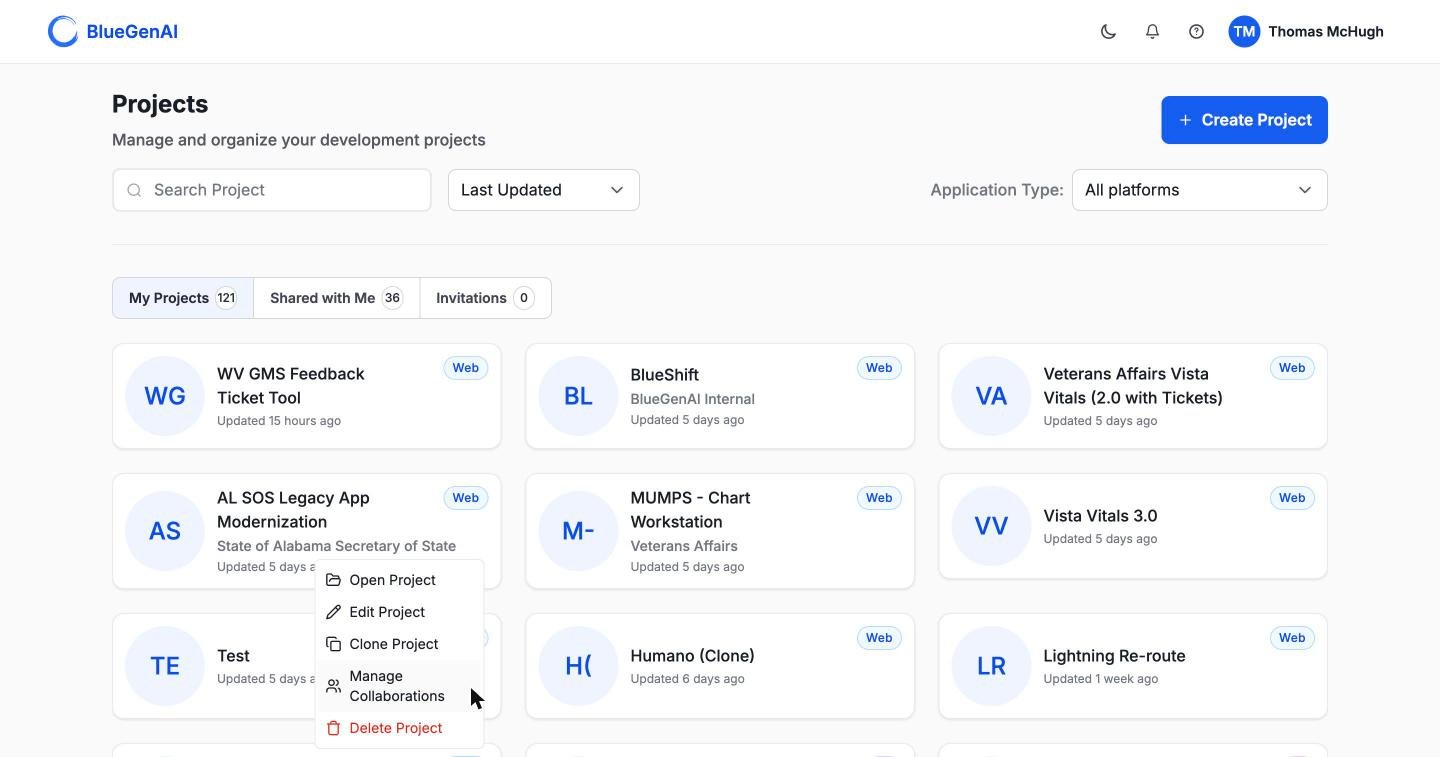 Hover a project card on the dashboard and open the menu at its lower right. Alongside **Clone Project** sit **Open**, **Edit**, **Manage Collaborations**, and **Delete**.
You can change the title, description, and client name as you clone, so a copy made for a new client does not arrive carrying the old one's name.
## What a Clone Copies
**On a web project, almost everything:**
| Copied | Not copied |
| ------------------------------------- | ----------------------------------- |
| The blueprint and its source material | Conversation history, in any mode |
| Requirement folders and artifacts | Tickets and Epics |
| Uploaded files | Collaborators and their invitations |
| Generated source code | Version history |
| The design system | The running application |
| Stored credentials | |
| Connected MCP servers | |
**On a low-code project, only the blueprint.** Files, artifacts, requirement folders, source, design system, credentials, and MCP connections are all left behind. A cloned low-code project starts with its specification and nothing else.
Platform credentials carry over only when the clone stays on the same platform. A clone that changes platform starts without them, because the connection details of one platform mean nothing to another.
## Tickets and Epics Do Not Come with It
**A clone brings the specification, not the work breakdown.** No Tickets and no Epics are copied, even on a web project where everything else is.
That is usually what you want. Generate Tickets from the cloned blueprint and you get a fresh set matching the specification as it now stands, rather than inheriting statuses and assignments from a different engagement. See [CAB-to-Ticket conversion](/tickets/cab-to-ticket-conversion).
## While It Runs
Cloning a project with source code takes a while, and the copy appears on your dashboard while the work is still going on. Its state moves from cloning to completed.
If it fails, the card offers a retry. **Retries are capped at three**, after which the message reads:
> Maximum retry attempts (3) exceeded. Please delete this clone and create a new one.
Deleting a failed clone removes only the copy. The original is untouched.
## Your Next Step
Turning a specification into Tickets and Epics.
Roles, invitations, and sharing.
## Related topics
- [Troubleshooting & FAQ](/tips-and-tricks/troubleshooting-faq.md)
- [Weekly release notes](/changelog/weekly-release-notes.md)
- [BlueGenAI Documentation](/index.md)
- [Navigation & UI Guide](/getting-started/navigation-ui-guide.md)
- [Components of your Blueprint](/cab/blueprint-output-reference.md)
Hover a project card on the dashboard and open the menu at its lower right. Alongside **Clone Project** sit **Open**, **Edit**, **Manage Collaborations**, and **Delete**.
You can change the title, description, and client name as you clone, so a copy made for a new client does not arrive carrying the old one's name.
## What a Clone Copies
**On a web project, almost everything:**
| Copied | Not copied |
| ------------------------------------- | ----------------------------------- |
| The blueprint and its source material | Conversation history, in any mode |
| Requirement folders and artifacts | Tickets and Epics |
| Uploaded files | Collaborators and their invitations |
| Generated source code | Version history |
| The design system | The running application |
| Stored credentials | |
| Connected MCP servers | |
**On a low-code project, only the blueprint.** Files, artifacts, requirement folders, source, design system, credentials, and MCP connections are all left behind. A cloned low-code project starts with its specification and nothing else.
Platform credentials carry over only when the clone stays on the same platform. A clone that changes platform starts without them, because the connection details of one platform mean nothing to another.
## Tickets and Epics Do Not Come with It
**A clone brings the specification, not the work breakdown.** No Tickets and no Epics are copied, even on a web project where everything else is.
That is usually what you want. Generate Tickets from the cloned blueprint and you get a fresh set matching the specification as it now stands, rather than inheriting statuses and assignments from a different engagement. See [CAB-to-Ticket conversion](/tickets/cab-to-ticket-conversion).
## While It Runs
Cloning a project with source code takes a while, and the copy appears on your dashboard while the work is still going on. Its state moves from cloning to completed.
If it fails, the card offers a retry. **Retries are capped at three**, after which the message reads:
> Maximum retry attempts (3) exceeded. Please delete this clone and create a new one.
Deleting a failed clone removes only the copy. The original is untouched.
## Your Next Step
Turning a specification into Tickets and Epics.
Roles, invitations, and sharing.
## Related topics
- [Troubleshooting & FAQ](/tips-and-tricks/troubleshooting-faq.md)
- [Weekly release notes](/changelog/weekly-release-notes.md)
- [BlueGenAI Documentation](/index.md)
- [Navigation & UI Guide](/getting-started/navigation-ui-guide.md)
- [Components of your Blueprint](/cab/blueprint-output-reference.md)