> ## Documentation Index
> Fetch the complete documentation index at: https://docs.bluegenai.com/llms.txt
> Use this file to discover all available pages before exploring further.
# Legacy Code Translation Guide
> How the CAB reads an existing codebase and turns it into written requirements, and what it deliberately does not do.
**This is code-to-requirements, not code-to-code.** Nothing here converts COBOL to Java, or any language to any other language. The output is a specification in plain language, not a translated codebase. If you are looking for automated language migration, this is not that.
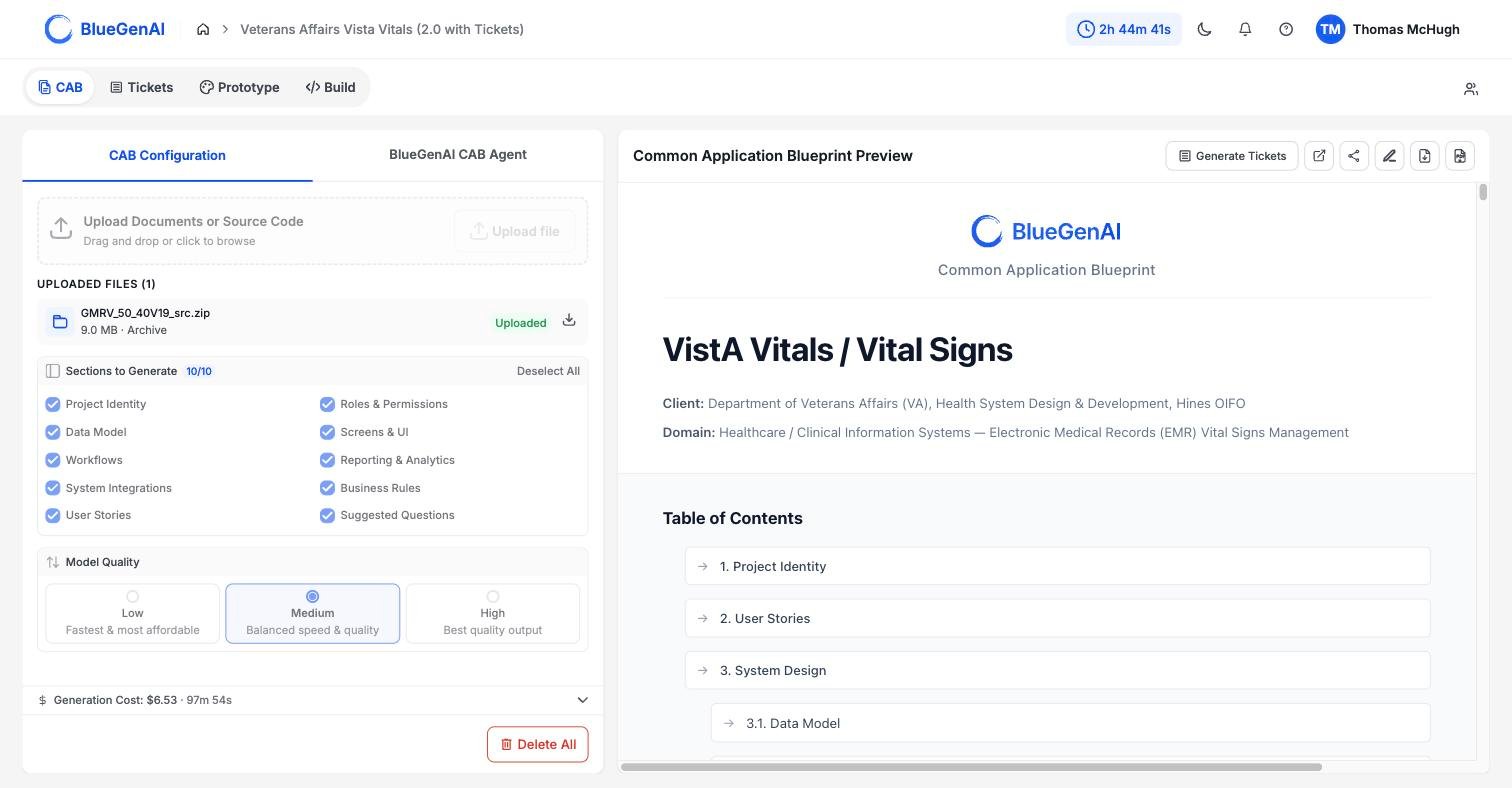 ## What Actually Happens
**Your code is read and described, not parsed.** There is no compiler, no syntax tree, and no language-specific analyser in this path. A language model reads each file the way a senior analyst would and writes down what it found.
The run works through four steps.
1. **Discovery.** Your archive is extracted and the source files inside it are found. Text-based files are kept; compiled output and binary artifacts are set aside.
2. **Batching.** Files are grouped into batches of 25, with three batches read at once.
3. **Summarisation.** Each batch goes to a language model, which returns a purpose line and an implementation summary per file, plus any blueprint-relevant items it recognised.
4. **Carry-forward.** Those summaries become input to the phases that build your blueprint. The original code is not carried into the finished document.
## What It Looks For
The model is not summarising in the abstract. It is told which kinds of thing to watch for, and that list comes from the sections you selected before the run.
| Section you selected | What the model looks for in your code |
| --------------------- | --------------------------------------------------------------- |
| Data Model | Database models, schemas, entity definitions, and their fields |
| Screens & UI/UX | UI components, pages, views, and forms |
| Workflows | State machines, process flows, and status transitions |
| Rules | Validation rules, business logic, and calculations |
| System Integrations | API calls, external service connections, and webhooks |
| Reporting & Analytics | Report definitions, analytics, and dashboards |
| Roles | End-user roles, excluding project governance and delivery roles |
Deselect a section and the model stops looking for that kind of thing. This is why the section checklist is occasionally worth setting deliberately on a legacy project rather than left at its default.
The model is instructed to use the exact names it finds in your code, to record specific values such as validation thresholds and status codes, and not to invent anything that is not there.
## What Is Skipped
Compiled output and binary files carry nothing a reader can use, so they are excluded before analysis begins. The exclusion list covers ordinary build artifacts and a long tail of platform-specific ones, including COBOL compiled output, mainframe load modules, MUMPS and VistA binary exports, and Java, .NET, and Delphi build products.
Zip your application code files into a single directory for the best and fastest result. This streamlines uploads and groups your content for the CAB Agents to most effectively analyze.
## Where This Fits in a Modernization Project
The result is a written specification of a system that already exists. That is useful in three situations, and worth being clear about which one you are in.
* **You have the code but not the documentation.** The blueprint becomes the description nobody wrote down, and the **Suggested Questions** section names what the code alone could not settle.
* **You are scoping a rebuild.** The blueprint gives you a specification to estimate against, in the same shape as one written from scratch.
* **You are building more onto this application.** The corrected blueprint feeds Tickets and then Build Mode, so the specification you validated is the one that gets built.
**What it does not give you is a production-ready system spec.** The process above will document your legacy solution and make clear what needs to be Re-built in order to modernize the solution. But you will need to ensure the CAB is accurate and complete through stakeholder requirement clarification sessions. You will also need to add in any NEW requirements which will further modernize or change the scope of your legacy application - otherwise you will get a modernized version that behaves very nearly like your original solution, though on a more modern and sustainable codebase.
This phase (Legacy Code Translation) is skipped when no source code was uploaded. A CAB built only from written documents runs the same way without it.
## Your Next Step
Source code alone rarely settles every question, and the blueprint tells you which ones remain open.
How the blueprint surfaces gaps and turns them into questions for stakeholders.
What each of the 10 sections tells you about the system.
## Related topics
- [Component Reference](/low-code/salesforce/build-mode/component-reference.md)
- [What is the CAB?](/cab/what-is-cab.md)
- [BlueGenAI Documentation](/index.md)
- [What Goes In?](/cab/supported-input-types.md)
- [Deployment Guide](/web-apps/build-mode/deployment-guide.md)
## What Actually Happens
**Your code is read and described, not parsed.** There is no compiler, no syntax tree, and no language-specific analyser in this path. A language model reads each file the way a senior analyst would and writes down what it found.
The run works through four steps.
1. **Discovery.** Your archive is extracted and the source files inside it are found. Text-based files are kept; compiled output and binary artifacts are set aside.
2. **Batching.** Files are grouped into batches of 25, with three batches read at once.
3. **Summarisation.** Each batch goes to a language model, which returns a purpose line and an implementation summary per file, plus any blueprint-relevant items it recognised.
4. **Carry-forward.** Those summaries become input to the phases that build your blueprint. The original code is not carried into the finished document.
## What It Looks For
The model is not summarising in the abstract. It is told which kinds of thing to watch for, and that list comes from the sections you selected before the run.
| Section you selected | What the model looks for in your code |
| --------------------- | --------------------------------------------------------------- |
| Data Model | Database models, schemas, entity definitions, and their fields |
| Screens & UI/UX | UI components, pages, views, and forms |
| Workflows | State machines, process flows, and status transitions |
| Rules | Validation rules, business logic, and calculations |
| System Integrations | API calls, external service connections, and webhooks |
| Reporting & Analytics | Report definitions, analytics, and dashboards |
| Roles | End-user roles, excluding project governance and delivery roles |
Deselect a section and the model stops looking for that kind of thing. This is why the section checklist is occasionally worth setting deliberately on a legacy project rather than left at its default.
The model is instructed to use the exact names it finds in your code, to record specific values such as validation thresholds and status codes, and not to invent anything that is not there.
## What Is Skipped
Compiled output and binary files carry nothing a reader can use, so they are excluded before analysis begins. The exclusion list covers ordinary build artifacts and a long tail of platform-specific ones, including COBOL compiled output, mainframe load modules, MUMPS and VistA binary exports, and Java, .NET, and Delphi build products.
Zip your application code files into a single directory for the best and fastest result. This streamlines uploads and groups your content for the CAB Agents to most effectively analyze.
## Where This Fits in a Modernization Project
The result is a written specification of a system that already exists. That is useful in three situations, and worth being clear about which one you are in.
* **You have the code but not the documentation.** The blueprint becomes the description nobody wrote down, and the **Suggested Questions** section names what the code alone could not settle.
* **You are scoping a rebuild.** The blueprint gives you a specification to estimate against, in the same shape as one written from scratch.
* **You are building more onto this application.** The corrected blueprint feeds Tickets and then Build Mode, so the specification you validated is the one that gets built.
**What it does not give you is a production-ready system spec.** The process above will document your legacy solution and make clear what needs to be Re-built in order to modernize the solution. But you will need to ensure the CAB is accurate and complete through stakeholder requirement clarification sessions. You will also need to add in any NEW requirements which will further modernize or change the scope of your legacy application - otherwise you will get a modernized version that behaves very nearly like your original solution, though on a more modern and sustainable codebase.
This phase (Legacy Code Translation) is skipped when no source code was uploaded. A CAB built only from written documents runs the same way without it.
## Your Next Step
Source code alone rarely settles every question, and the blueprint tells you which ones remain open.
How the blueprint surfaces gaps and turns them into questions for stakeholders.
What each of the 10 sections tells you about the system.
## Related topics
- [Component Reference](/low-code/salesforce/build-mode/component-reference.md)
- [What is the CAB?](/cab/what-is-cab.md)
- [BlueGenAI Documentation](/index.md)
- [What Goes In?](/cab/supported-input-types.md)
- [Deployment Guide](/web-apps/build-mode/deployment-guide.md)