> ## Documentation Index
> Fetch the complete documentation index at: https://docs.bluegenai.com/llms.txt
> Use this file to discover all available pages before exploring further.
# What is the CAB?
> The Common Application Blueprint: a specification the platform generates from your source material, which you then review and correct.
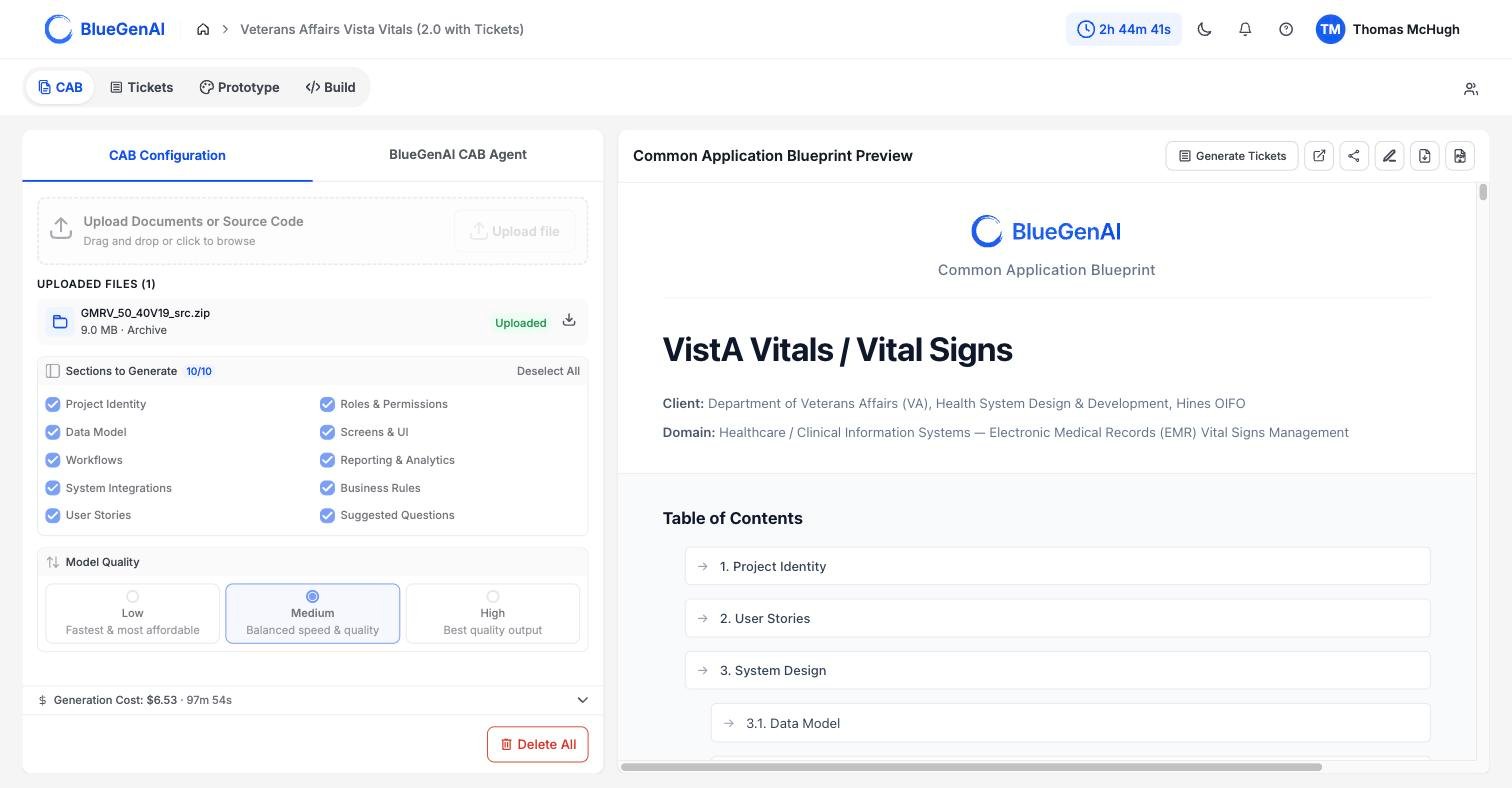
**CABs are generated!** You do not write a CAB. You supply the raw material: a solicitation, a requirements pack, a legacy codebase, all three, or more. The platform reads it and produces the specification, and your work is reviewing what came back and correcting what it got wrong.
 ## Why It Exists
**Requirements work usually starts with a blank page, and the blank page is the expensive part.** Reading a 200-page solicitation and turning it into entities, roles, screens, workflows, and rules takes weeks, and the result varies with whoever did it.
A CAB inverts that. The platform does the first pass across everything you give it and produces a complete draft in one structured shape. You start from a document to correct rather than a document to write, and the parts you correct are the parts that needed a person.
The output covers 10 sections, from the problem statement through to the questions your source material left open. See [Blueprint Output Reference](/cab/blueprint-output-reference) for what each one contains.
## Generated, Then Refined
A CAB moves through two distinct phases:
**Automated Generation.** You choose your sections and a quality setting, and the run proceeds through seven phases without further input. Nothing asks you to fill anything in.
**Editing to Refine and Clarify.** Once a blueprint exists you can change it directly, or ask the CAB agent to change it for you. Either way the change goes through a review step before it updates the CAB: every proposed change is tagged as coming from a person or from the AI, and you will review and **accept** or **reject** each one.
**CABs fit into the traditional SDLC by serving as the foundation for your Joint Application Development (JAD) or Requirement Clarification sessions.**
The CAB will provide detailed user stories, a comprehensive system spec, and suggested questions about the body of work.
This output, available just hours after starting the process - makes you ready to support stakeholder discussions immediately - not after several months of work!
## When to Build a CAB
Not every project needs a CAB. It is possible to go straight into Tickets or to use the Builder directly. But the CAB is your surest and smartest path towards an Enterprise-grade and Production Quality build. Use a CAB when:
* **You have source material and need a specification.** A solicitation, a requirements pack, an existing system, or a mix.
* **You are modernizing a system that is poorly documented.** See [Legacy Code Translation Guide](/cab/legacy-code-translation-guide).
* **You need to know what your requirements do not explicitly say.** The User Stories and Generated Questions are very useful output for helping ensure you have captured complete and clear scope.
## When Not To
* **You have no source material.** A CAB is generated from what you supply. With nothing to read, there is nothing to generate.
* **You want to explore an idea rather than specify one.** Prototype Mode is the faster route to mock up something you can look at, this can also be a valuable tool for supporting JAD sessions.
* **Your want to Experiment with a living Prototype.** Use the builder Directly - guided by manual direction, mock ups, or other light documentation. This allows you to very quickly pop up an application which may support generating clear requirements downstream.
## Where to Go Next
Start by generating your first CAB. The pages in this section follow the order you use them in.
What you set before a run, the seven phases, and how to pause or resume.
Accepted file types and how each is handled.
What each of the 10 sections tells you about your application.
How manual edits and AI suggestions are reviewed and applied.
How uploaded source code becomes a specification.
How the blueprint surfaces gaps and turns them into questions.
## Related topics
- [Editing your CAB](/cab/editing-your-cab.md)
- [CAB-to-Ticket conversion](/tickets/cab-to-ticket-conversion.md)
- [What Goes In?](/cab/supported-input-types.md)
- [Using CAB to support Requirement Clarification](/cab/requirement-clarification.md)
- [What are Tickets and how do they help me?](/tickets/what-are-tickets.md)
## Why It Exists
**Requirements work usually starts with a blank page, and the blank page is the expensive part.** Reading a 200-page solicitation and turning it into entities, roles, screens, workflows, and rules takes weeks, and the result varies with whoever did it.
A CAB inverts that. The platform does the first pass across everything you give it and produces a complete draft in one structured shape. You start from a document to correct rather than a document to write, and the parts you correct are the parts that needed a person.
The output covers 10 sections, from the problem statement through to the questions your source material left open. See [Blueprint Output Reference](/cab/blueprint-output-reference) for what each one contains.
## Generated, Then Refined
A CAB moves through two distinct phases:
**Automated Generation.** You choose your sections and a quality setting, and the run proceeds through seven phases without further input. Nothing asks you to fill anything in.
**Editing to Refine and Clarify.** Once a blueprint exists you can change it directly, or ask the CAB agent to change it for you. Either way the change goes through a review step before it updates the CAB: every proposed change is tagged as coming from a person or from the AI, and you will review and **accept** or **reject** each one.
**CABs fit into the traditional SDLC by serving as the foundation for your Joint Application Development (JAD) or Requirement Clarification sessions.**
The CAB will provide detailed user stories, a comprehensive system spec, and suggested questions about the body of work.
This output, available just hours after starting the process - makes you ready to support stakeholder discussions immediately - not after several months of work!
## When to Build a CAB
Not every project needs a CAB. It is possible to go straight into Tickets or to use the Builder directly. But the CAB is your surest and smartest path towards an Enterprise-grade and Production Quality build. Use a CAB when:
* **You have source material and need a specification.** A solicitation, a requirements pack, an existing system, or a mix.
* **You are modernizing a system that is poorly documented.** See [Legacy Code Translation Guide](/cab/legacy-code-translation-guide).
* **You need to know what your requirements do not explicitly say.** The User Stories and Generated Questions are very useful output for helping ensure you have captured complete and clear scope.
## When Not To
* **You have no source material.** A CAB is generated from what you supply. With nothing to read, there is nothing to generate.
* **You want to explore an idea rather than specify one.** Prototype Mode is the faster route to mock up something you can look at, this can also be a valuable tool for supporting JAD sessions.
* **Your want to Experiment with a living Prototype.** Use the builder Directly - guided by manual direction, mock ups, or other light documentation. This allows you to very quickly pop up an application which may support generating clear requirements downstream.
## Where to Go Next
Start by generating your first CAB. The pages in this section follow the order you use them in.
What you set before a run, the seven phases, and how to pause or resume.
Accepted file types and how each is handled.
What each of the 10 sections tells you about your application.
How manual edits and AI suggestions are reviewed and applied.
How uploaded source code becomes a specification.
How the blueprint surfaces gaps and turns them into questions.
## Related topics
- [Editing your CAB](/cab/editing-your-cab.md)
- [CAB-to-Ticket conversion](/tickets/cab-to-ticket-conversion.md)
- [What Goes In?](/cab/supported-input-types.md)
- [Using CAB to support Requirement Clarification](/cab/requirement-clarification.md)
- [What are Tickets and how do they help me?](/tickets/what-are-tickets.md)