> ## Documentation Index
> Fetch the complete documentation index at: https://docs.bluegenai.com/llms.txt
> Use this file to discover all available pages before exploring further.
# Platform Overview & Architecture
> Where your projects live and how they are set up.
## The Pieces
**Your Project and the Application you build are related but separate things.** The *project* is your workspace and it persists whether or not the application is running. This includes the CAB, Tickets, and any uploaded or system-generated artifacts.
The *application* is built and deployed by the platform and has its own separate URL and login credentials. Itcan be stopped and started without affecting your project workspace.
 Note that certain maintenance events or activity cleanups may bring your application down. It can be restarted at any time by navigating to the Build tab and either directing the agent or pressing the "Start Application" icon that will appear in place of the "Stop Application" icon.
## Where Your Application Runs
Applications built on BlueGenAI are natively hosted by our platform *(with the exception of low code platforms, which may be hosted externally)*. Each application gets a URL you can share, and you can stop and start it from the workspace.
Giving access to the generated application **does NOT** grant someone access to the project workspace.
Web projects can also be given a custom domain. See [Deployment Guide](/web-apps/build-mode/deployment-guide).
## Low-Code Projects Work Differently
For Low Code applications (Tyler Application Platform, ServiceNow, PowerApps, and Salesforce) the platform may not host the solution being built.
Instead, Users are expected to provide access to their own deployed application or else you may contact BlueGenAI for information about how to get access to a compatible low code environment.
A low-code project asks you to link your site before you can build.
Note that certain maintenance events or activity cleanups may bring your application down. It can be restarted at any time by navigating to the Build tab and either directing the agent or pressing the "Start Application" icon that will appear in place of the "Stop Application" icon.
## Where Your Application Runs
Applications built on BlueGenAI are natively hosted by our platform *(with the exception of low code platforms, which may be hosted externally)*. Each application gets a URL you can share, and you can stop and start it from the workspace.
Giving access to the generated application **does NOT** grant someone access to the project workspace.
Web projects can also be given a custom domain. See [Deployment Guide](/web-apps/build-mode/deployment-guide).
## Low-Code Projects Work Differently
For Low Code applications (Tyler Application Platform, ServiceNow, PowerApps, and Salesforce) the platform may not host the solution being built.
Instead, Users are expected to provide access to their own deployed application or else you may contact BlueGenAI for information about how to get access to a compatible low code environment.
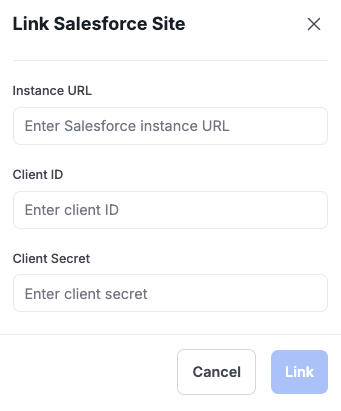
A low-code project asks you to link your site before you can build.
 ## How to Access the Application you are Building
Accounts and passwords for the application your are building are handled the Builder agent and are separate and unrelated to your BlueGenAI account credentials and your Project-level collaboration permissions. Instead you will prompt the builder to provide you with access/account credentials suitable to the access that application is using.
## Your Next Step
Requirements to deployed application, in one pass.
Its capabilities, and the boundaries around them.
## Related topics
- [BlueGenAI Documentation](/index.md)
- [Low Code Overview](/low-code/overview.md)
- [Overview](/web-apps/build-mode/overview.md)
## How to Access the Application you are Building
Accounts and passwords for the application your are building are handled the Builder agent and are separate and unrelated to your BlueGenAI account credentials and your Project-level collaboration permissions. Instead you will prompt the builder to provide you with access/account credentials suitable to the access that application is using.
## Your Next Step
Requirements to deployed application, in one pass.
Its capabilities, and the boundaries around them.
## Related topics
- [BlueGenAI Documentation](/index.md)
- [Low Code Overview](/low-code/overview.md)
- [Overview](/web-apps/build-mode/overview.md)