> ## Documentation Index
> Fetch the complete documentation index at: https://docs.bluegenai.com/llms.txt
> Use this file to discover all available pages before exploring further.
# What is BlueGenAI?
> BlueGenAI is an enterprise-grade AI software modernization platform. It carries a project from source material (requirements, documents, or a legacy codebase) through clarification, design specification, build, and testing to a running application, keeping every step traceable back to your organization's requirements.
 ## An Enterprise Approach
**BlueGenAI's approach is the opposite of vibe coding.**
## An Enterprise Approach
**BlueGenAI's approach is the opposite of vibe coding.**
Prompting your way to something "good enough" may be ok for prototypes, but it is not good enough for producing production-grade enterprise applications. Producing software an organisation can sign off on, maintain, and securely deploy is a different discipline, and that is what this platform is built for.
This approach can be summarized by several core concepts:
| Concept | How the platform delivers it |
| ----------------------------------------------------------------------------- | ----------------------------------------------------------------------------------------------------------------------------------------------------------------------- |
| **Traceability** back to well-clarified requirements | Every project starts by producing a **Common Application Blueprint** - a specification generated from your own documents and source code, which you refine and correct. |
| **Carefully planned stages** that build interlocked functionality in sequence | Work is broken into **Tickets** and grouped into **Epics**, each Epic is a wave engineered in a deliberate build order |
| **Rigorous validation** against well-defined acceptance criteria | Acceptance criteria are written into User Stories, and **App testing** exercises them against the application as it is built |
These principles fit together. The acceptance criteria that get tested are the ones written into the User Stories within the CAB which produce the requirements that generated the Ticket, in the Epic that set its place in the Build. Nothing in that chain is added afterwards to make the work look organised.
See [Compliance & Evidence](/getting-started/compliance-and-evidence) for what the platform records as that chain runs.
## What You Can Build
**Full-code web applications**, built from the ground-up and end to end: front end, database, and a URL you can hand to a colleague.
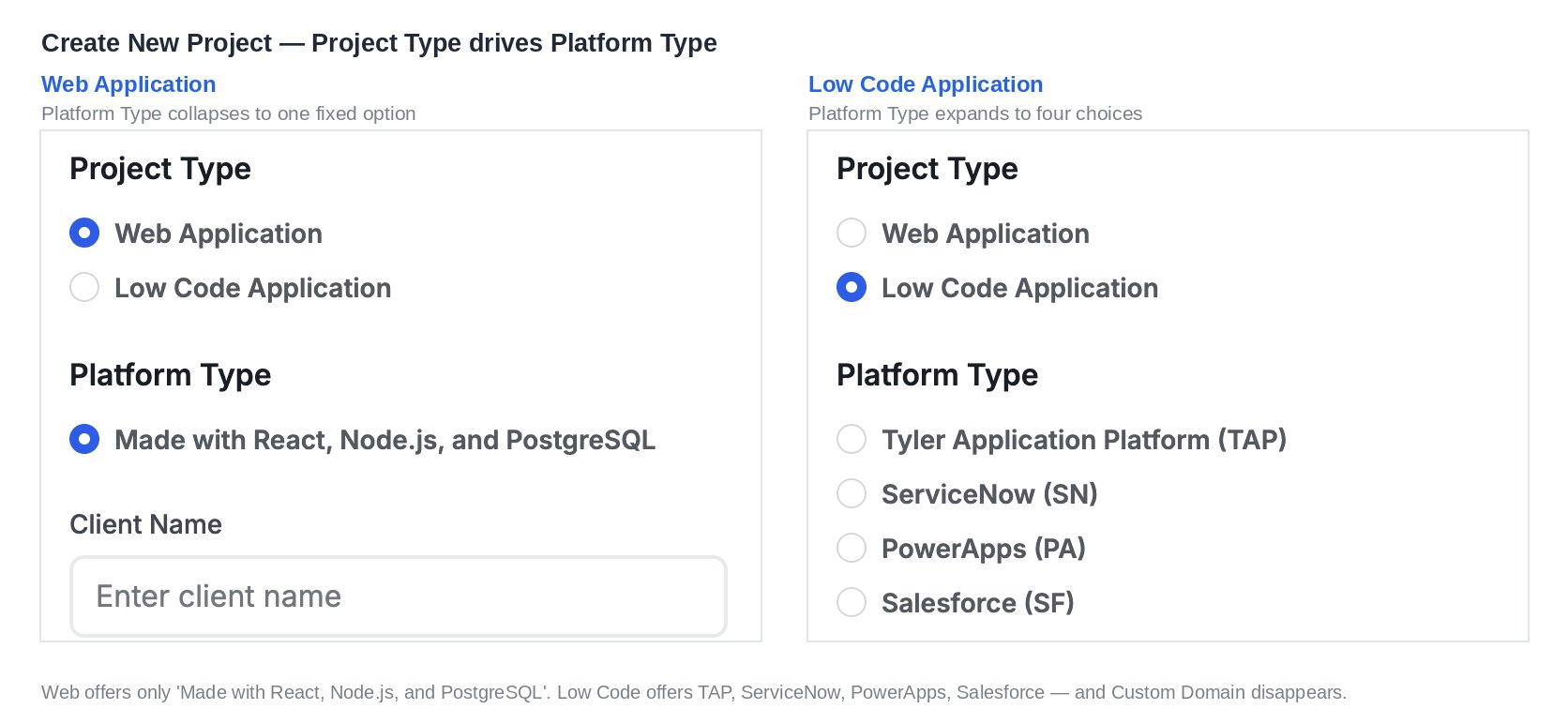
**Low-code applications** on Tyler Application Platform, ServiceNow, PowerApps, and Salesforce, where the platform performs configuration and building directly onto those platforms.
 ## How a Project Runs
1. **Create your Project.** Choose your technology platform and prepare your materials
2. **Upload what you have.** A solicitation, a requirements pack, an existing codebase, or all three. Then **Generate a CAB.** The platform reads your material and writes the specification, including a list of what your source material left undecided. *(Optionally create mock ups in **Prototype** mode to aid your design discussions)*
3. **Refine and Clarify your requirements.** Edit your CAB using the platform's tools to guide you to clear requirements.
4. **Generate Tickets.** The corrected specification becomes units of work, grouped into Epics that set the build order.
5. **Build your Application.** Guided by your expertise; BlueGenAI's builder will leverage Epics, Tickets, supplementary materials, and manual direction to iteratively build your application
6. **Test and Deploy.** As it is being built the platform tests the development of your application against the previously defined acceptance criteria. The end result is a full stack application ready for review, refinement, and acceptance testing.
While the best applications use the whole process end-to-end, BlueGenAI's features are flexible and independent, allowing you to use exactly the tools you need for a given effort.
## Where to Go Next
Source material to deployed application, in one pass.
The dashboard, the workspaces, and the four modes.
What a CAB is and how the platform generates one.
Prototype Mode, Build Mode, and what the agent does.
TAP, ServiceNow, PowerApps, and Salesforce.
Roles, invitations, and sharing.
## Related topics
- [BlueGenAI Documentation](/index.md)
- [Common Workflows by Role](/tips-and-tricks/common-workflows-by-role.md)
- [Prompting Best Practices](/tips-and-tricks/prompting-best-practices.md)
- [What Goes In?](/cab/supported-input-types.md)
- [Editing your CAB](/cab/editing-your-cab.md)
## How a Project Runs
1. **Create your Project.** Choose your technology platform and prepare your materials
2. **Upload what you have.** A solicitation, a requirements pack, an existing codebase, or all three. Then **Generate a CAB.** The platform reads your material and writes the specification, including a list of what your source material left undecided. *(Optionally create mock ups in **Prototype** mode to aid your design discussions)*
3. **Refine and Clarify your requirements.** Edit your CAB using the platform's tools to guide you to clear requirements.
4. **Generate Tickets.** The corrected specification becomes units of work, grouped into Epics that set the build order.
5. **Build your Application.** Guided by your expertise; BlueGenAI's builder will leverage Epics, Tickets, supplementary materials, and manual direction to iteratively build your application
6. **Test and Deploy.** As it is being built the platform tests the development of your application against the previously defined acceptance criteria. The end result is a full stack application ready for review, refinement, and acceptance testing.
While the best applications use the whole process end-to-end, BlueGenAI's features are flexible and independent, allowing you to use exactly the tools you need for a given effort.
## Where to Go Next
Source material to deployed application, in one pass.
The dashboard, the workspaces, and the four modes.
What a CAB is and how the platform generates one.
Prototype Mode, Build Mode, and what the agent does.
TAP, ServiceNow, PowerApps, and Salesforce.
Roles, invitations, and sharing.
## Related topics
- [BlueGenAI Documentation](/index.md)
- [Common Workflows by Role](/tips-and-tricks/common-workflows-by-role.md)
- [Prompting Best Practices](/tips-and-tricks/prompting-best-practices.md)
- [What Goes In?](/cab/supported-input-types.md)
- [Editing your CAB](/cab/editing-your-cab.md)