> ## Documentation Index
> Fetch the complete documentation index at: https://docs.bluegenai.com/llms.txt
> Use this file to discover all available pages before exploring further.
# Low Code Overview
> The four supported low-code platforms, what the agent configures on each, and how low-code output differs from a full-code web application.
A low-code project produces configuration in a platform you already own, rather than a codebase the platform hosts. That difference shapes everything else about how these projects work.
## Choosing a Platform
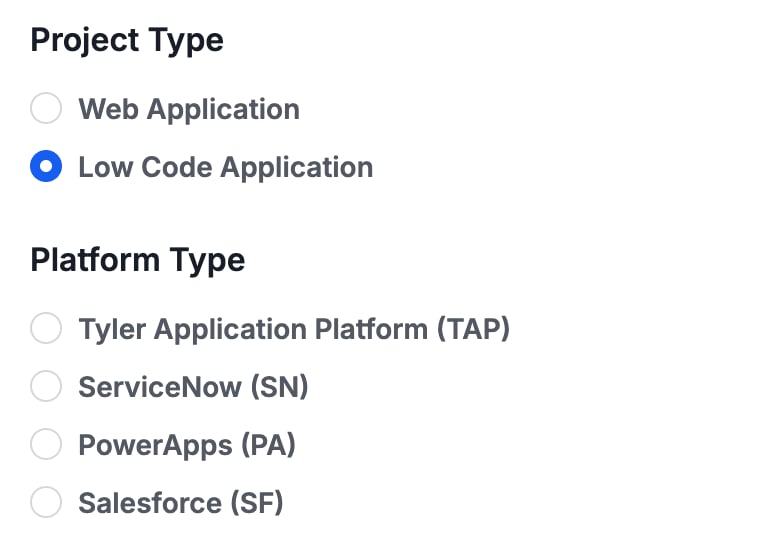
Which platforms you can choose is decided at the moment you create the project. Selecting **Low Code Application** as the Project Type replaces the single fixed Web stack with the four low-code platforms.
 ## Full-Code and Low-Code Projects Compared
Both start from the same place: requirements, and a specification generated from them. They diverge in what they produce.
| | Full-code web application | Low-code application |
| ----------------- | ------------------------------------------------------------------------------------------ | -------------------------------------------------------------------- |
| **Output** | A complete Web Application including Database, Application Server, generated codebase, etc | Configuration within your platform (sometimes including custom code) |
| **Where it runs** | Hosted by the platform at its own address | In the platform environment you connect |
| **Prerequisite** | None | A connected site or environment |
| **Custom domain** | Available | Not applicable |
The specification is application-neutral, which is what allows the same reviewed blueprint to drive either target. See [What is CAB?](/cab/what-is-cab).
## Building in Low Code Platforms (Overview)
## Full-Code and Low-Code Projects Compared
Both start from the same place: requirements, and a specification generated from them. They diverge in what they produce.
| | Full-code web application | Low-code application |
| ----------------- | ------------------------------------------------------------------------------------------ | -------------------------------------------------------------------- |
| **Output** | A complete Web Application including Database, Application Server, generated codebase, etc | Configuration within your platform (sometimes including custom code) |
| **Where it runs** | Hosted by the platform at its own address | In the platform environment you connect |
| **Prerequisite** | None | A connected site or environment |
| **Custom domain** | Available | Not applicable |
The specification is application-neutral, which is what allows the same reviewed blueprint to drive either target. See [What is CAB?](/cab/what-is-cab).
## Building in Low Code Platforms (Overview)
 | Platform | What the agent configures |
| -------------------------------------------------------- | -------------------------------------------------------------------------------------------------------------------------------------------------------------------------------- |
| [**Tyler Application Platform**](/low-code/tap/overview) | Tracked objects and reference data, forms and UI policies, listings and charts, custom views, workflow states and transitions, roles and groups, Jasper reports |
| [**ServiceNow**](/low-code/servicenow/overview) | Tables and fields, users, roles and groups, classic UI forms and lists, Service Portal pages and widgets, state models, business rules and scripts, reports |
| [**PowerApps**](/low-code/powerapps/overview) | Dataverse tables, columns and relationships, model-driven forms and views, the sitemap, solutions, business rules, charts and dashboards |
| [**Salesforce**](/low-code/salesforce/overview) | Custom objects and fields, profiles and sharing rules, page layouts and list views, Lightning apps and pages, Lightning Web Components, flows and Apex, reports, platform events |
**At this time, the Tyler Application Platform is the only platform with Prototype Mode.**
## Where Direct Configuration Stops
All four platforms are reached through APIs rather than by driving their user interfaces, so anything without an API surface has to be done in the platform directly.
**Salesforce and PowerApps sit at opposite ends of this.** On Salesforce everything listed above is applied to the org, including Apex and Lightning Web Components. **PowerApps carries an additional and more specific boundary.** Security roles, Power Automate flows, and form JavaScript are specified in exact detail rather than applied, because those areas have limited write surface through the tooling. If you are planning a PowerApps build, read that distinction before you start: [PowerApps Overview](/low-code/powerapps/overview).
## Your Next Step
The only platform with both Prototype and Build Mode.
Seven configuration areas, from tables to Service Portal.
Dataverse schema, model-driven UI, and where the boundary sits.
How the specification that drives either target gets generated.
## Related topics
- [Weekly release notes](/changelog/weekly-release-notes.md)
- [BlueGenAI Documentation](/index.md)
- [Platform Overview & Architecture](/getting-started/platform-overview-architecture.md)
- [Troubleshooting & FAQ](/tips-and-tricks/troubleshooting-faq.md)
- [Integrations](/admin-platform/integrations.md)
| Platform | What the agent configures |
| -------------------------------------------------------- | -------------------------------------------------------------------------------------------------------------------------------------------------------------------------------- |
| [**Tyler Application Platform**](/low-code/tap/overview) | Tracked objects and reference data, forms and UI policies, listings and charts, custom views, workflow states and transitions, roles and groups, Jasper reports |
| [**ServiceNow**](/low-code/servicenow/overview) | Tables and fields, users, roles and groups, classic UI forms and lists, Service Portal pages and widgets, state models, business rules and scripts, reports |
| [**PowerApps**](/low-code/powerapps/overview) | Dataverse tables, columns and relationships, model-driven forms and views, the sitemap, solutions, business rules, charts and dashboards |
| [**Salesforce**](/low-code/salesforce/overview) | Custom objects and fields, profiles and sharing rules, page layouts and list views, Lightning apps and pages, Lightning Web Components, flows and Apex, reports, platform events |
**At this time, the Tyler Application Platform is the only platform with Prototype Mode.**
## Where Direct Configuration Stops
All four platforms are reached through APIs rather than by driving their user interfaces, so anything without an API surface has to be done in the platform directly.
**Salesforce and PowerApps sit at opposite ends of this.** On Salesforce everything listed above is applied to the org, including Apex and Lightning Web Components. **PowerApps carries an additional and more specific boundary.** Security roles, Power Automate flows, and form JavaScript are specified in exact detail rather than applied, because those areas have limited write surface through the tooling. If you are planning a PowerApps build, read that distinction before you start: [PowerApps Overview](/low-code/powerapps/overview).
## Your Next Step
The only platform with both Prototype and Build Mode.
Seven configuration areas, from tables to Service Portal.
Dataverse schema, model-driven UI, and where the boundary sits.
How the specification that drives either target gets generated.
## Related topics
- [Weekly release notes](/changelog/weekly-release-notes.md)
- [BlueGenAI Documentation](/index.md)
- [Platform Overview & Architecture](/getting-started/platform-overview-architecture.md)
- [Troubleshooting & FAQ](/tips-and-tricks/troubleshooting-faq.md)
- [Integrations](/admin-platform/integrations.md)