> ## Documentation Index
> Fetch the complete documentation index at: https://docs.bluegenai.com/llms.txt
> Use this file to discover all available pages before exploring further.
# Epics
> Epics group Tickets and set the order work gets built in, and how re-evaluating them affects manual changes.
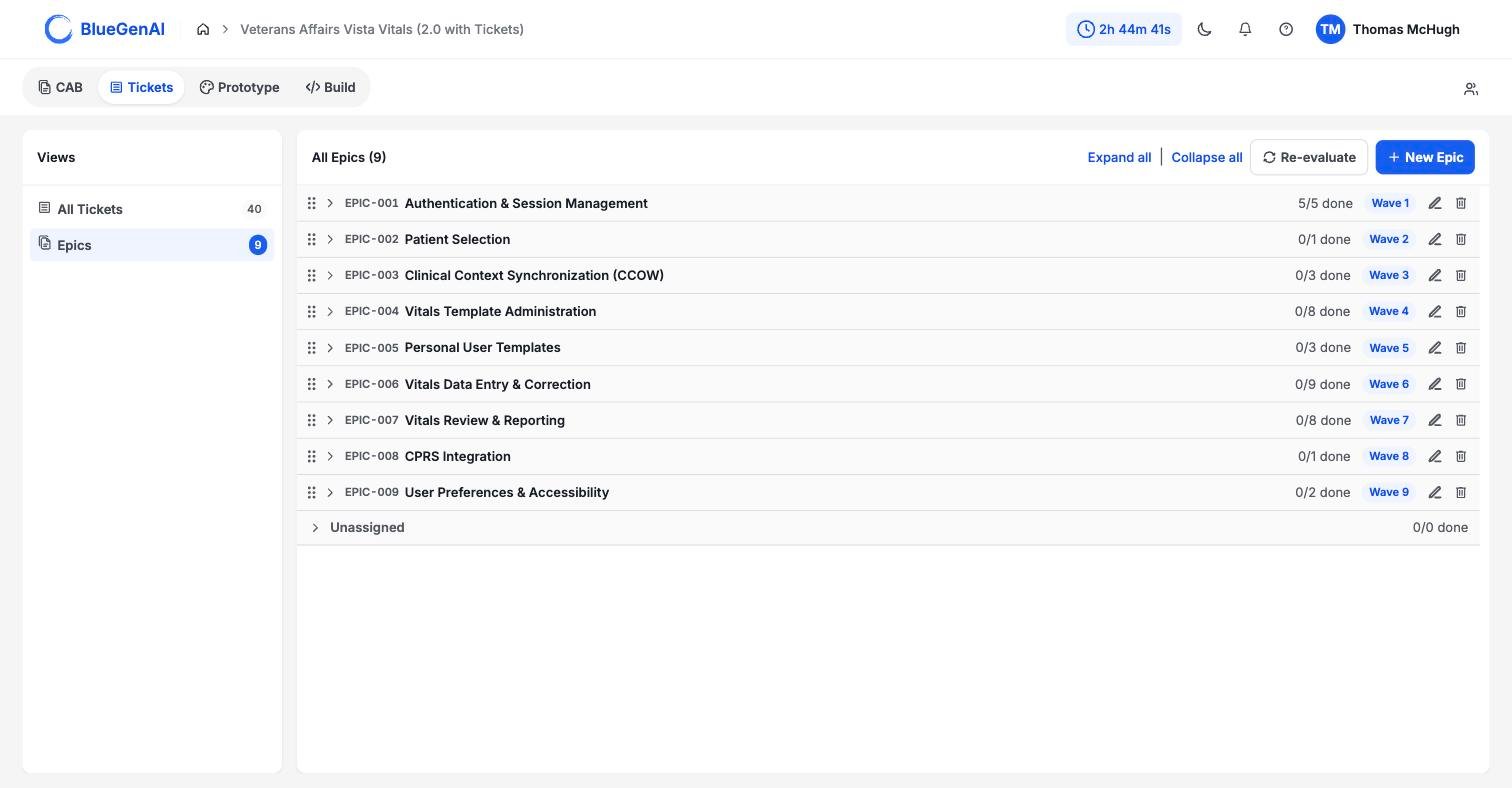 ## Epics and Waves
**Epics are groups of Tickets while Waves are the order of work.**
An Epic is the group. Its position in the build order is its Wave. The first Epic to be worked is Wave 1.
By default, Epics and Waves will have the same number. Epic 1 will be Wave 1. However user's have the ability to manually re-order Epics to perform the work as desired. When an Epic is moved to a different order, the Wave it corresponds to will be moved.
If Epic 3 is moved to the top, it will become Wave 1 while still being named Epic 3.
The Tickets list and the detail panel show **Epic** and **Wave** as separate fields, which makes them look like two things you set. You only ever set one. Move an Epic up or down and its Wave follows automatically; reorder the list and every Wave renumbers to match.
There is no way to manually give a Ticket a Wave without putting it in an Epic.
If you are reading a Ticket and wondering which field to change, the answer is neither. Wave is a readout of where its Epic sits. Move the Ticket to a different Epic, or move the Epic itself.
## Reading an Epic Row
| Element | What it tells you |
| ----------- | ----------------------------------------- |
| `EPIC-001` | A stable id that survives reordering |
| Name | What the group covers, at a high level |
| `5/5 done` | Closed Tickets against total in that Epic |
| `Wave 1` | Its position in the build order |
| Drag handle | Reorder by dragging |
At the bottom sits an **Unassigned** row holding Tickets that belong to no Epic. It has no id, no wave badge, and no edit or delete controls, because it is a bucket rather than an Epic. The count in the header excludes it.
## Working with Epics
## Epics and Waves
**Epics are groups of Tickets while Waves are the order of work.**
An Epic is the group. Its position in the build order is its Wave. The first Epic to be worked is Wave 1.
By default, Epics and Waves will have the same number. Epic 1 will be Wave 1. However user's have the ability to manually re-order Epics to perform the work as desired. When an Epic is moved to a different order, the Wave it corresponds to will be moved.
If Epic 3 is moved to the top, it will become Wave 1 while still being named Epic 3.
The Tickets list and the detail panel show **Epic** and **Wave** as separate fields, which makes them look like two things you set. You only ever set one. Move an Epic up or down and its Wave follows automatically; reorder the list and every Wave renumbers to match.
There is no way to manually give a Ticket a Wave without putting it in an Epic.
If you are reading a Ticket and wondering which field to change, the answer is neither. Wave is a readout of where its Epic sits. Move the Ticket to a different Epic, or move the Epic itself.
## Reading an Epic Row
| Element | What it tells you |
| ----------- | ----------------------------------------- |
| `EPIC-001` | A stable id that survives reordering |
| Name | What the group covers, at a high level |
| `5/5 done` | Closed Tickets against total in that Epic |
| `Wave 1` | Its position in the build order |
| Drag handle | Reorder by dragging |
At the bottom sits an **Unassigned** row holding Tickets that belong to no Epic. It has no id, no wave badge, and no edit or delete controls, because it is a bucket rather than an Epic. The count in the header excludes it.
## Working with Epics
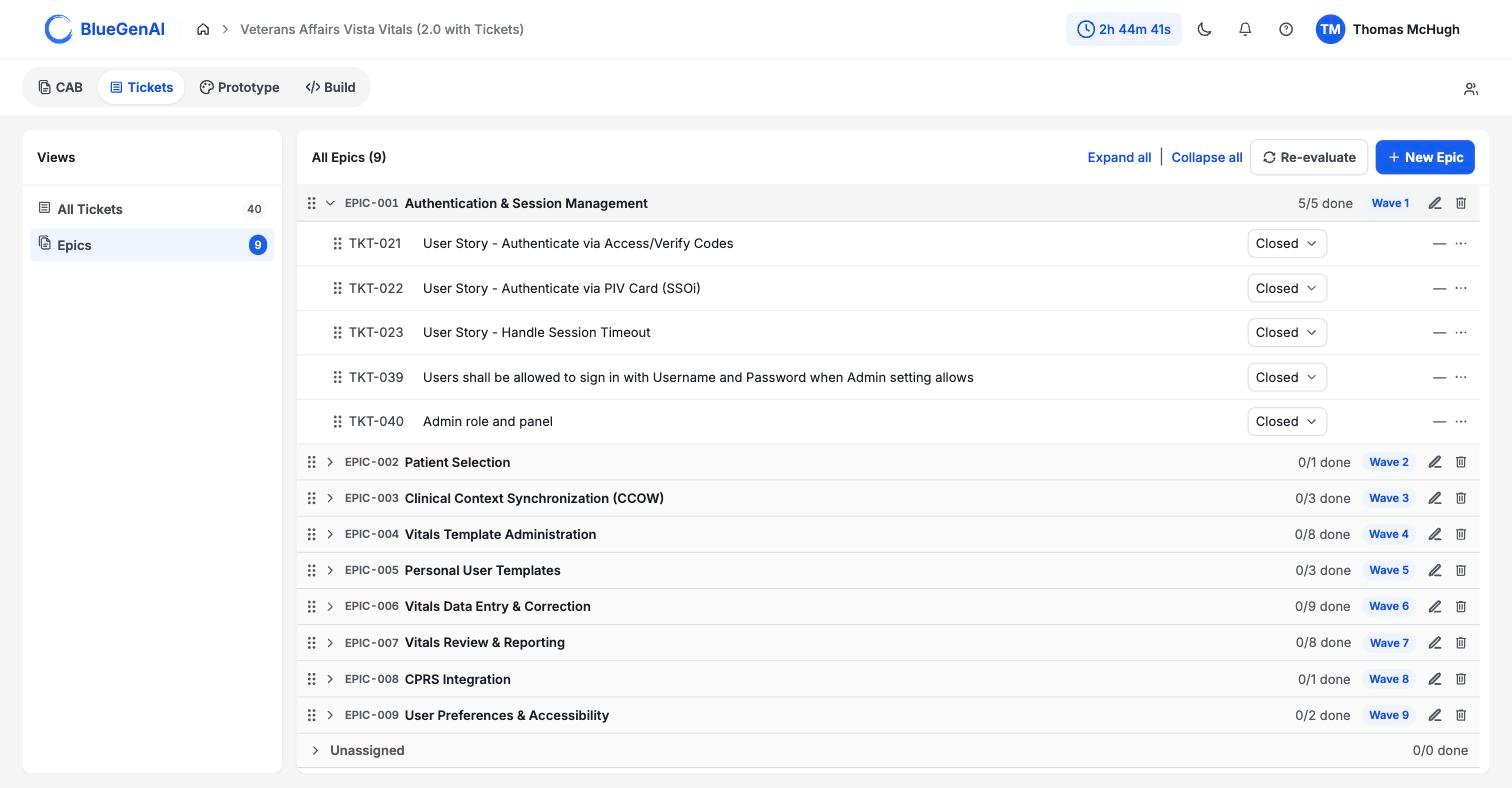 **New Epic** adds one at the end of the list. It is an inline field rather than a dialog, and the add control stays disabled until you type a name.
**Reordering** works by dragging, either an Epic among Epics or a Ticket within an Epic. Re-ordering an Epic changes its Wave #.
**New Epic** adds one at the end of the list. It is an inline field rather than a dialog, and the add control stays disabled until you type a name.
**Reordering** works by dragging, either an Epic among Epics or a Ticket within an Epic. Re-ordering an Epic changes its Wave #.
Moving a Ticket between Epics is done through the overflow control on its row, which opens a searchable list of every Epic.
**Deleting** an Epic does not delete its Tickets. They fall back to **Unassigned** and the remaining Waves renumber.
## Re-evaluate Build Order
**This is the most destructive control in Tickets.** It deletes every Epic and rebuilds the whole grouping from scratch using AI. Use only when you are confident a comprehensive re-work is warranted.
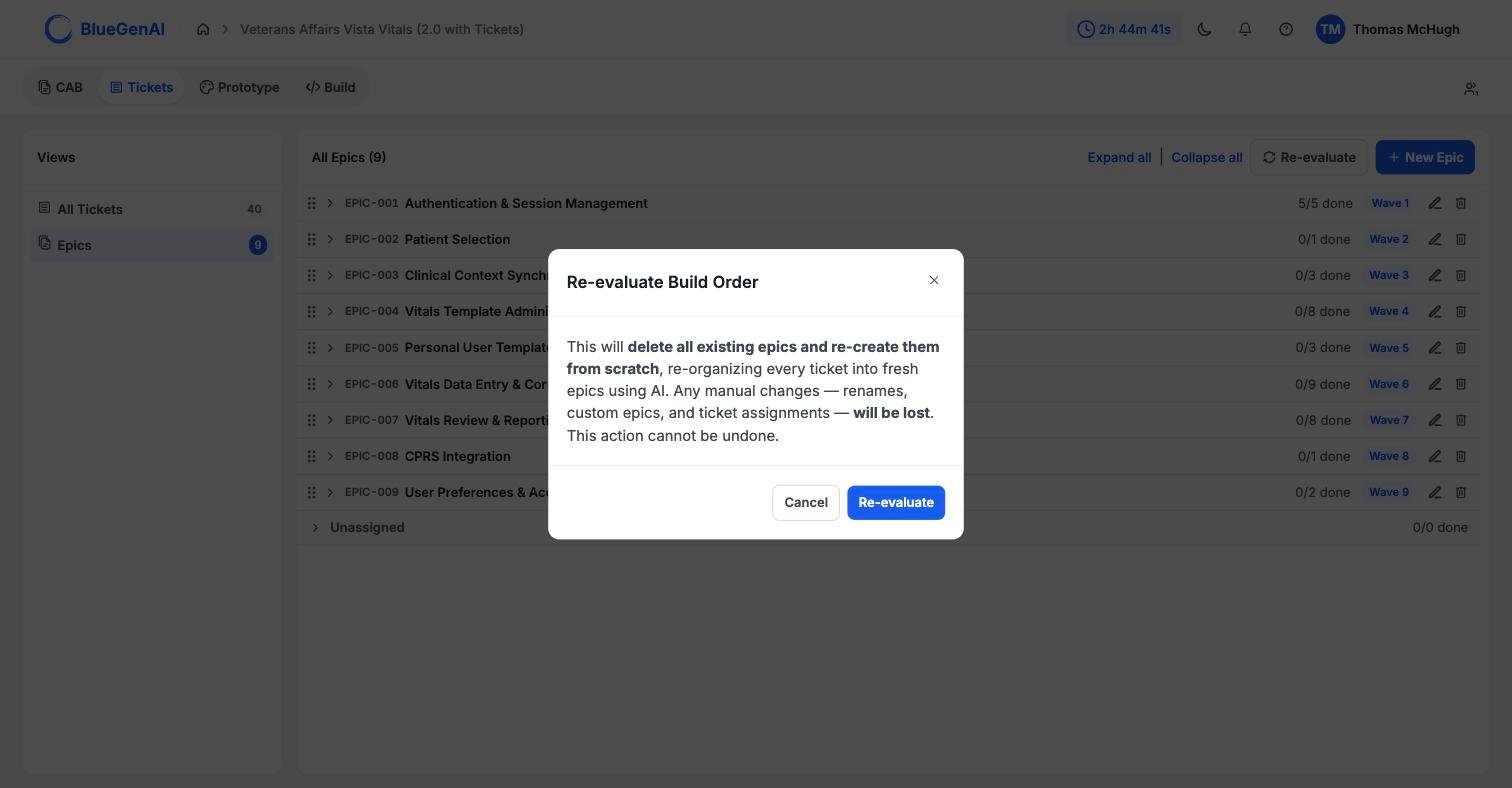 What gets deleted: every Epic you renamed, every Epic you created by hand, and every Ticket assignment you made. What survives: the Tickets themselves, which are regrouped rather than deleted.
Re-evaluating discards manual grouping work with no way back. Use it when the grouping is wrong enough to be worth restarting, not to refresh a mostly-good build order.
## Your Next Step
With work grouped and ordered, a Ticket can be handed to the build agent.
Referencing a Ticket in a Build conversation, and what context comes with it.
Editing, reassigning, and deleting Tickets by hand.
## Related topics
- [Using Tickets and Epics in Build Mode](/tickets/using-tickets-in-build-mode.md)
- [What are Tickets and how do they help me?](/tickets/what-are-tickets.md)
- [Troubleshooting & FAQ](/tips-and-tricks/troubleshooting-faq.md)
- [Cloning your project](/admin-platform/cloning-your-project.md)
- [CAB-to-Ticket conversion](/tickets/cab-to-ticket-conversion.md)
What gets deleted: every Epic you renamed, every Epic you created by hand, and every Ticket assignment you made. What survives: the Tickets themselves, which are regrouped rather than deleted.
Re-evaluating discards manual grouping work with no way back. Use it when the grouping is wrong enough to be worth restarting, not to refresh a mostly-good build order.
## Your Next Step
With work grouped and ordered, a Ticket can be handed to the build agent.
Referencing a Ticket in a Build conversation, and what context comes with it.
Editing, reassigning, and deleting Tickets by hand.
## Related topics
- [Using Tickets and Epics in Build Mode](/tickets/using-tickets-in-build-mode.md)
- [What are Tickets and how do they help me?](/tickets/what-are-tickets.md)
- [Troubleshooting & FAQ](/tips-and-tricks/troubleshooting-faq.md)
- [Cloning your project](/admin-platform/cloning-your-project.md)
- [CAB-to-Ticket conversion](/tickets/cab-to-ticket-conversion.md)