> ## Documentation Index
> Fetch the complete documentation index at: https://docs.bluegenai.com/llms.txt
> Use this file to discover all available pages before exploring further.
# What are Tickets and how do they help me?
> What do tickets include, where do they come from, and how are they used?
A Ticket is an individual unit of work on a project, either generated from your CAB or created manually.
Tickets are where a specification stops being part of a document and becomes a list of things to do. Each one carries enough detail to be picked up, assigned, and tracked.
 ## Where Tickets Come From
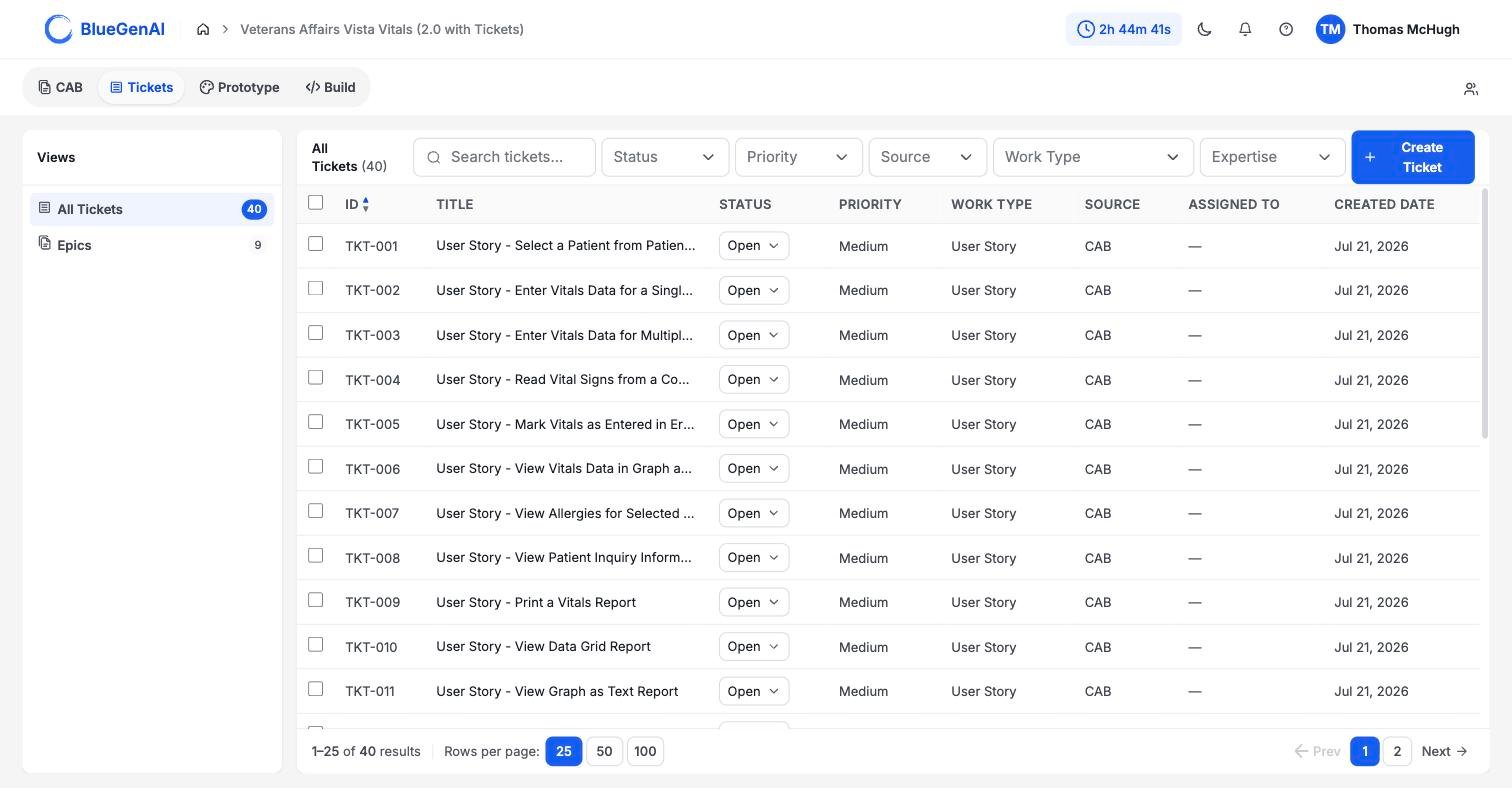
Every Ticket carries a **Source** of either `CAB` or `Manual` to clearly identify it's origin.
**CAB** means the Ticket was generated from your blueprint. Each one keeps a **CAB Reference** pointing back at the element it came from, so you can trace a piece of work to the requirement that produced it. See [CAB-to-Ticket conversion](/tickets/cab-to-ticket-conversion).
**Manual** means somebody wrote it. See [Manually creating or editing tickets](/tickets/creating-editing-tickets).
## What is in a Ticket
## Where Tickets Come From
Every Ticket carries a **Source** of either `CAB` or `Manual` to clearly identify it's origin.
**CAB** means the Ticket was generated from your blueprint. Each one keeps a **CAB Reference** pointing back at the element it came from, so you can trace a piece of work to the requirement that produced it. See [CAB-to-Ticket conversion](/tickets/cab-to-ticket-conversion).
**Manual** means somebody wrote it. See [Manually creating or editing tickets](/tickets/creating-editing-tickets).
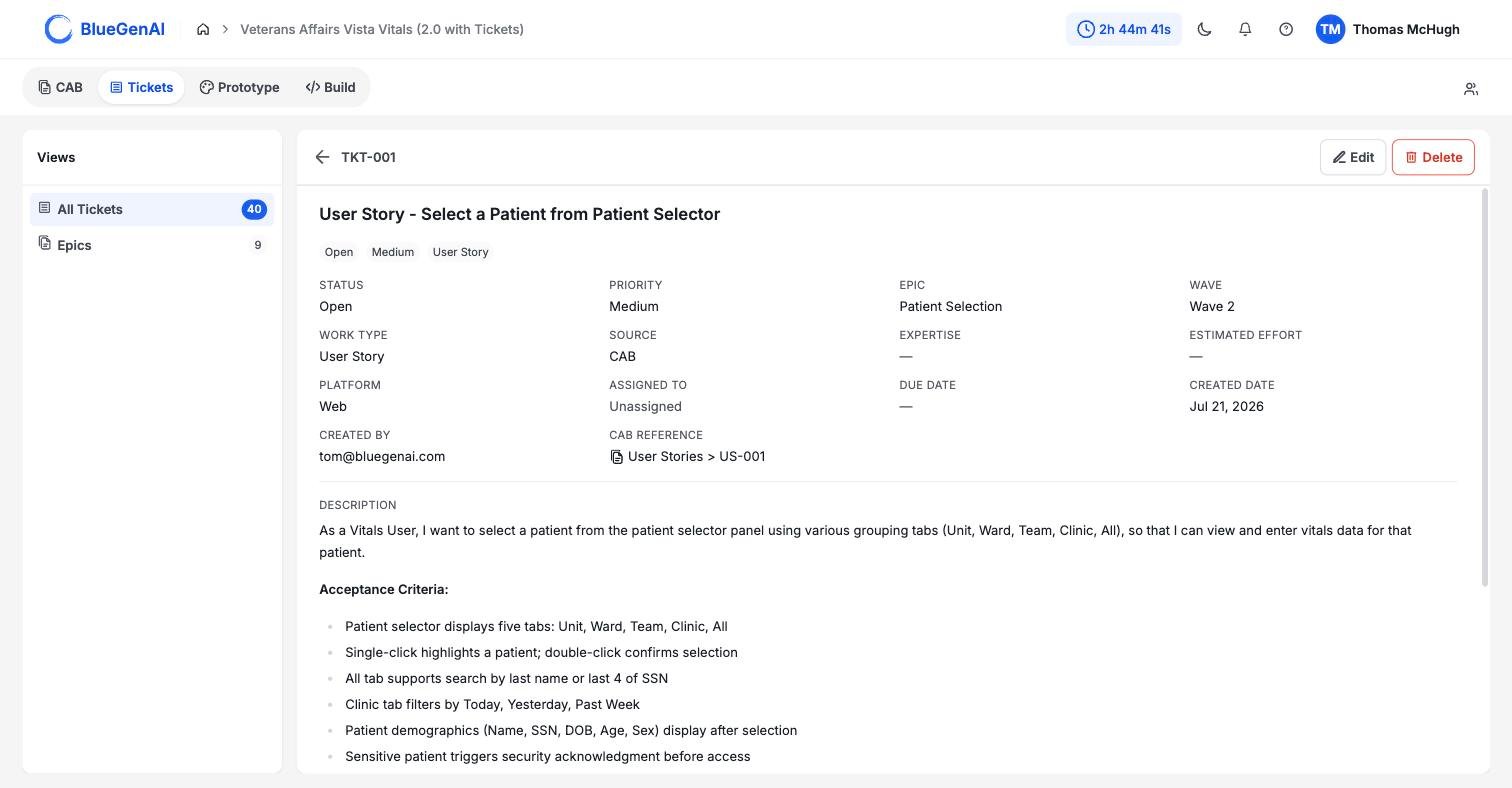
## What is in a Ticket
 | Field | What it holds |
| ---------------- | --------------------------------------------------------------------------------------------------------------------------------------------------------------------------------------------------------------- |
| Status | `Open`, `In Progress`, or `Closed` |
| Priority | `Low`, `Medium`, or `High` |
| Work Type | What kind of work needs to be done |
| Source | `CAB` or `Manual` |
| Expertise | `Agent`, `Human`, or `Agent + Human` |
| Estimated Effort | for Human or Agent + Human tickets, this shows an estimated Level of Effort (LOE) as determined by the Ticket AI agent |
| Epic | Which group of work this belongs to, and where that group sits in the build order |
| Assigned To | A name and email, or `Unassigned` |
| CAB Reference | The blueprint element this came from - this is key to traceability |
| Description | Details surrounding the body of the work. For system-generated Tickets this will include testing tests and acceptance criteria |
| Note | Reviewer or Developer commentary. If present on the CAB, it will be carried over from the blueprint. Otherwise it can be manually added into the ticket as the work is performed, tested, or otherwise reviewed |
## Status Is a Label, Not a Workflow
A Ticket can move from any status to any other, in any direction. `Closed` is not final, and there is no rule requiring `In Progress` before it. Tickets may be re-opened as necessary to refine that functionality.
The field records where a piece of work stands, in the judgement of whoever set it. It does not gate anything, block anything, or trigger anything.
If your team needs a sequence, that agreement lives with your team rather than in the product.
## Epic and Wave Are the Same Thing
The detail panel shows **Epic** and **Wave** as two adjacent fields, which makes them look like two attributes. They are one.
An Epic is a group of Tickets. Its position in the build order is its Wave. Move an Epic and its Wave changes; you never set a Wave on a Ticket directly. See [Epics](/tickets/epics).
## Filtering the List
The filter bar offers search plus five dropdowns: **Status**, **Priority**, **Source**, **Work Type**, and **Expertise**. All five accept more than one value at a time. Sort, page, and filter state all live in the URL, so a filtered list can be shared as a link.
| Field | What it holds |
| ---------------- | --------------------------------------------------------------------------------------------------------------------------------------------------------------------------------------------------------------- |
| Status | `Open`, `In Progress`, or `Closed` |
| Priority | `Low`, `Medium`, or `High` |
| Work Type | What kind of work needs to be done |
| Source | `CAB` or `Manual` |
| Expertise | `Agent`, `Human`, or `Agent + Human` |
| Estimated Effort | for Human or Agent + Human tickets, this shows an estimated Level of Effort (LOE) as determined by the Ticket AI agent |
| Epic | Which group of work this belongs to, and where that group sits in the build order |
| Assigned To | A name and email, or `Unassigned` |
| CAB Reference | The blueprint element this came from - this is key to traceability |
| Description | Details surrounding the body of the work. For system-generated Tickets this will include testing tests and acceptance criteria |
| Note | Reviewer or Developer commentary. If present on the CAB, it will be carried over from the blueprint. Otherwise it can be manually added into the ticket as the work is performed, tested, or otherwise reviewed |
## Status Is a Label, Not a Workflow
A Ticket can move from any status to any other, in any direction. `Closed` is not final, and there is no rule requiring `In Progress` before it. Tickets may be re-opened as necessary to refine that functionality.
The field records where a piece of work stands, in the judgement of whoever set it. It does not gate anything, block anything, or trigger anything.
If your team needs a sequence, that agreement lives with your team rather than in the product.
## Epic and Wave Are the Same Thing
The detail panel shows **Epic** and **Wave** as two adjacent fields, which makes them look like two attributes. They are one.
An Epic is a group of Tickets. Its position in the build order is its Wave. Move an Epic and its Wave changes; you never set a Wave on a Ticket directly. See [Epics](/tickets/epics).
## Filtering the List
The filter bar offers search plus five dropdowns: **Status**, **Priority**, **Source**, **Work Type**, and **Expertise**. All five accept more than one value at a time. Sort, page, and filter state all live in the URL, so a filtered list can be shared as a link.
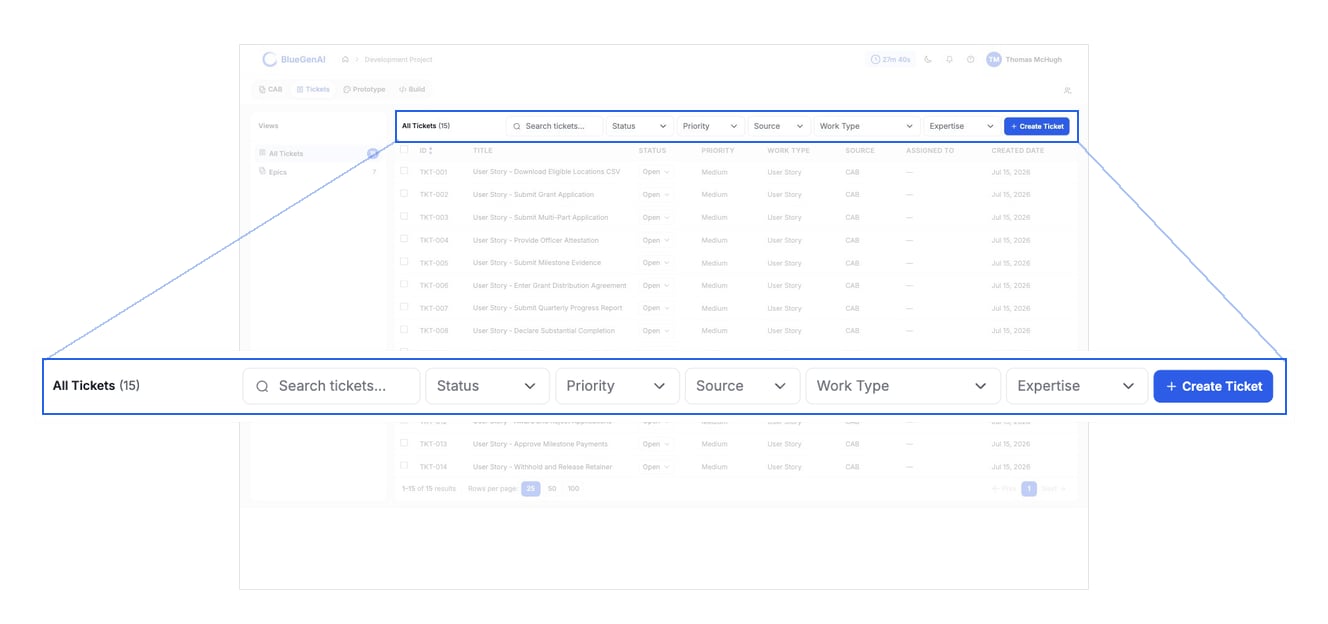 **The Work Type filter does not list `User Story`, and Tickets generated from a blueprint on a Web project all carry exactly that work type.**
Filtering by Work Type on such a project returns nothing. The filter offers 10 options; the product recognises 11. Use search, or filter by **Source** instead, until the option is added.
## Your Next Step
Tickets are most useful once they are grouped and ordered, which is what Epics are for.
How Epics set the build order, and what re-evaluating them costs you.
What the conversion produces, and what happens when you run it twice.
## Related topics
- [CAB-to-Ticket conversion](/tickets/cab-to-ticket-conversion.md)
- [Using Tickets and Epics in Build Mode](/tickets/using-tickets-in-build-mode.md)
- [Common Workflows by Role](/tips-and-tricks/common-workflows-by-role.md)
- [Workflow](/web-apps/build-mode/workflow.md)
- [Troubleshooting & FAQ](/tips-and-tricks/troubleshooting-faq.md)
**The Work Type filter does not list `User Story`, and Tickets generated from a blueprint on a Web project all carry exactly that work type.**
Filtering by Work Type on such a project returns nothing. The filter offers 10 options; the product recognises 11. Use search, or filter by **Source** instead, until the option is added.
## Your Next Step
Tickets are most useful once they are grouped and ordered, which is what Epics are for.
How Epics set the build order, and what re-evaluating them costs you.
What the conversion produces, and what happens when you run it twice.
## Related topics
- [CAB-to-Ticket conversion](/tickets/cab-to-ticket-conversion.md)
- [Using Tickets and Epics in Build Mode](/tickets/using-tickets-in-build-mode.md)
- [Common Workflows by Role](/tips-and-tricks/common-workflows-by-role.md)
- [Workflow](/web-apps/build-mode/workflow.md)
- [Troubleshooting & FAQ](/tips-and-tricks/troubleshooting-faq.md)