> ## Documentation Index
> Fetch the complete documentation index at: https://docs.bluegenai.com/llms.txt
> Use this file to discover all available pages before exploring further.
# Default Tech Stack
> The stack the build agent is instructed to produce, the conventions it follows, and how the gateway architecture differs by project version.
Every Web project the build agent produces uses the same stack, and it is fixed rather than selectable.
This is what the agent is **instructed** to build, not a guarantee of what a given project contains. It is a standing instruction in the agent's prompt, so a project that was steered elsewhere can differ.
## The Stack
| Layer | Technology |
| ---------- | ------------------------------------------------ |
| Frontend | React (Vite, Tailwind CSS, Wouter) |
| Backend | Node.js + Express |
| Database | PostgreSQL + Drizzle ORM |
| State | React Query |
| Auth | JWT on protected routes |
| Containers | Docker, via `docker-compose.yaml` |
| Gateway | Nginx reverse proxy, **version 2 projects only** |
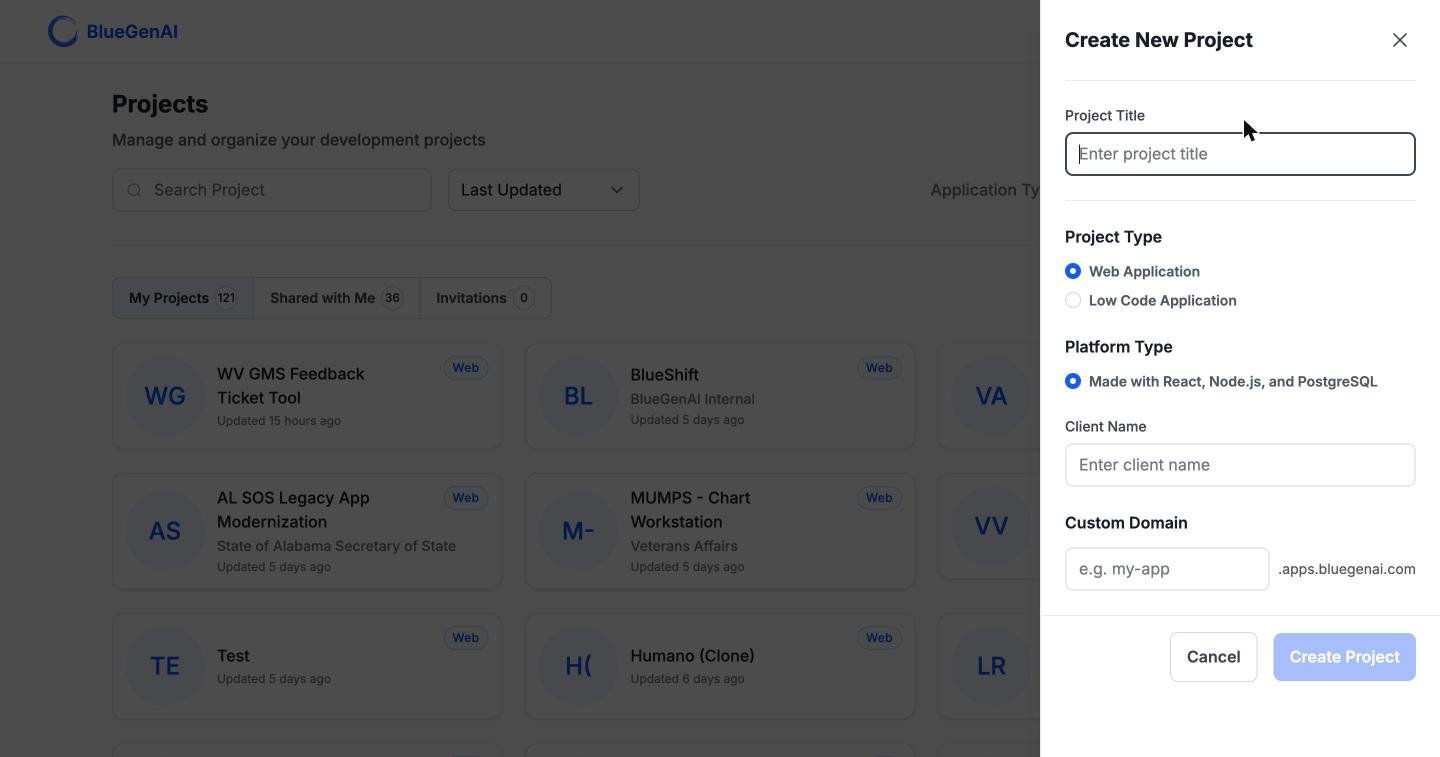
The Create Project form states it more briefly, as `Made with React, Node.js, and PostgreSQL`.
 ## Two Project Versions
Projects carry a prompt version that changes the architecture the agent builds.
| | Version 1 (original) | Version 2 (gateway) |
| ------------------ | --------------------------------- | --------------------------------------- |
| Entry point | Each service on its own host port | Nginx reverse proxy, single entry point |
| Exposed ports | Frontend and backend both exposed | `nginx` (primary) and `database` |
| Application URL | One URL per service | A single subdomain URL |
| Subdomain proxying | Not eligible | Eligible |
New projects are created at version 2. Version 1 projects continue to work and are not migrated.
## Conventions the Agent Follows
| Convention | Rule |
| ------------------- | --------------------------------------------------------------------------------------------------------------------------------------------------------------------- |
| Persistence | PostgreSQL for all persistent data. No in-memory or mock stores |
| Configuration | Every credential, constant, port, and host in a root `.env`, referenced from `docker-compose.yaml`. No hardcoded secrets or URLs |
| Env var names | `DATABASE_EXTERNAL_PORT`, `DATABASE_USERNAME`, `DATABASE_PASSWORD`, `DATABASE_NAME`. Alternates such as `POSTGRES_USER`, `DB_PORT` and `FRONTEND_PORT` are disallowed |
| Validation | Applied in both the frontend and the backend |
| Internal secrets | `JWT_SECRET`, database credentials, session and encryption keys are auto-generated |
| External secrets | Third-party service keys are requested from you; see [Credentials](/web-apps/credentials) |
| Repository contents | Code only. Anything describing the project is produced as a knowledge document, not committed |
## Version 2 Project Layout
Version 2 projects add an `nginx/` directory containing a production reverse-proxy configuration and its own Dockerfile based on `nginx:alpine`. Every service in `docker-compose.yaml` follows a fixed port-exposure pattern, and the gateway and database are the services that expose ports externally.
## Your Next Step
The stack is fixed, but what the agent does with it is governed by a longer set of rules.
Its tools, its operating rules, and the limits it works within.
Browsing the codebase and querying the database.
## Related topics
- [Component Reference](/low-code/salesforce/build-mode/component-reference.md)
- [Low Code Overview](/low-code/overview.md)
- [Build Agent Guide](/web-apps/build-mode/build-agent-guide.md)
- [Editing your CAB](/cab/editing-your-cab.md)
- [BlueGenAI Documentation](/index.md)
## Two Project Versions
Projects carry a prompt version that changes the architecture the agent builds.
| | Version 1 (original) | Version 2 (gateway) |
| ------------------ | --------------------------------- | --------------------------------------- |
| Entry point | Each service on its own host port | Nginx reverse proxy, single entry point |
| Exposed ports | Frontend and backend both exposed | `nginx` (primary) and `database` |
| Application URL | One URL per service | A single subdomain URL |
| Subdomain proxying | Not eligible | Eligible |
New projects are created at version 2. Version 1 projects continue to work and are not migrated.
## Conventions the Agent Follows
| Convention | Rule |
| ------------------- | --------------------------------------------------------------------------------------------------------------------------------------------------------------------- |
| Persistence | PostgreSQL for all persistent data. No in-memory or mock stores |
| Configuration | Every credential, constant, port, and host in a root `.env`, referenced from `docker-compose.yaml`. No hardcoded secrets or URLs |
| Env var names | `DATABASE_EXTERNAL_PORT`, `DATABASE_USERNAME`, `DATABASE_PASSWORD`, `DATABASE_NAME`. Alternates such as `POSTGRES_USER`, `DB_PORT` and `FRONTEND_PORT` are disallowed |
| Validation | Applied in both the frontend and the backend |
| Internal secrets | `JWT_SECRET`, database credentials, session and encryption keys are auto-generated |
| External secrets | Third-party service keys are requested from you; see [Credentials](/web-apps/credentials) |
| Repository contents | Code only. Anything describing the project is produced as a knowledge document, not committed |
## Version 2 Project Layout
Version 2 projects add an `nginx/` directory containing a production reverse-proxy configuration and its own Dockerfile based on `nginx:alpine`. Every service in `docker-compose.yaml` follows a fixed port-exposure pattern, and the gateway and database are the services that expose ports externally.
## Your Next Step
The stack is fixed, but what the agent does with it is governed by a longer set of rules.
Its tools, its operating rules, and the limits it works within.
Browsing the codebase and querying the database.
## Related topics
- [Component Reference](/low-code/salesforce/build-mode/component-reference.md)
- [Low Code Overview](/low-code/overview.md)
- [Build Agent Guide](/web-apps/build-mode/build-agent-guide.md)
- [Editing your CAB](/cab/editing-your-cab.md)
- [BlueGenAI Documentation](/index.md)