> ## Documentation Index
> Fetch the complete documentation index at: https://docs.bluegenai.com/llms.txt
> Use this file to discover all available pages before exploring further.
# MCP Integrations
> Connecting a remote MCP server so the build agent can use an external service's tools during a build.
MCP is the Model Context Protocol, an open standard for exposing a service's capabilities to an AI agent. The agent's own capabilities are fixed; a connected server is the only way to extend what it can reach.
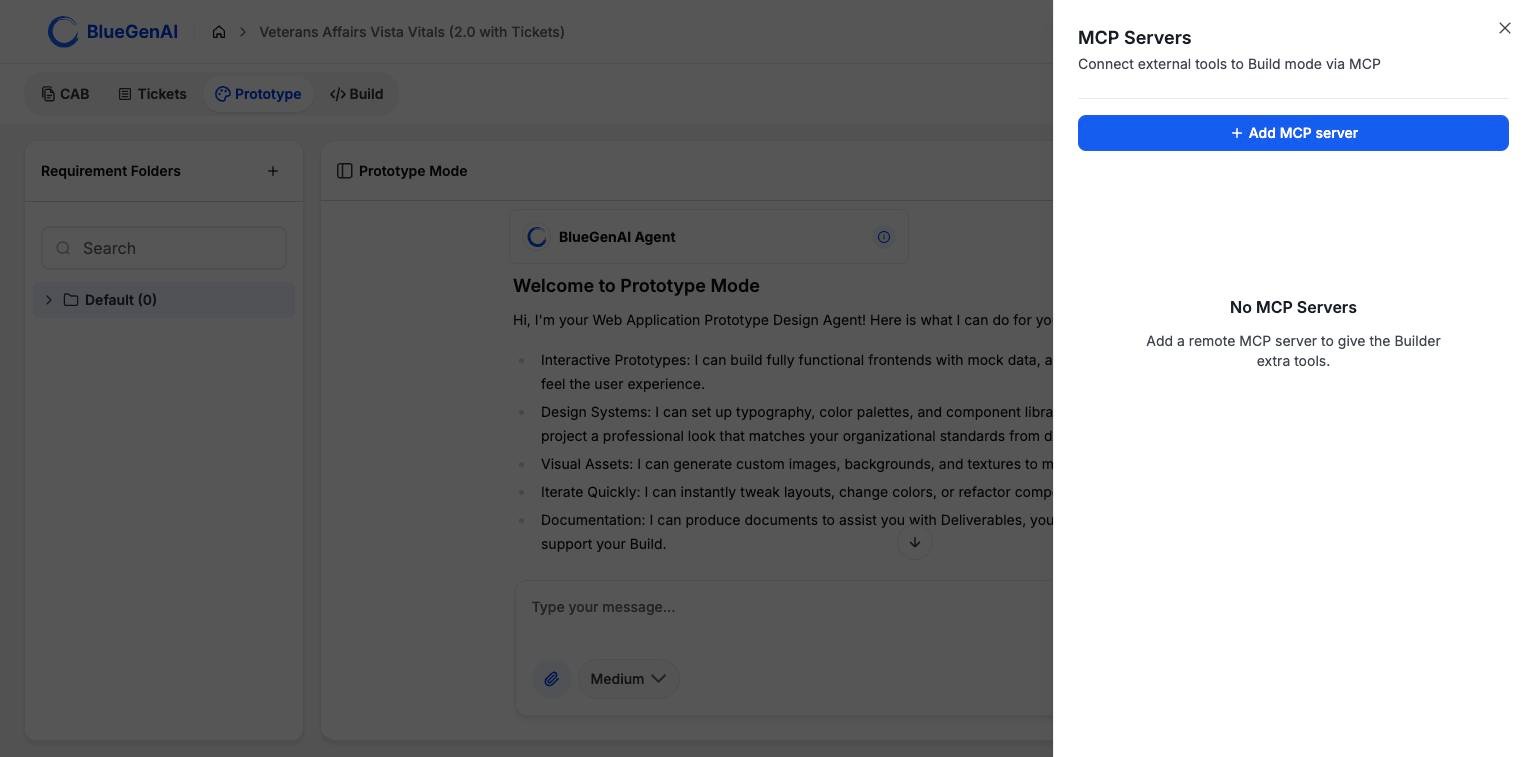 ## Adding a Server
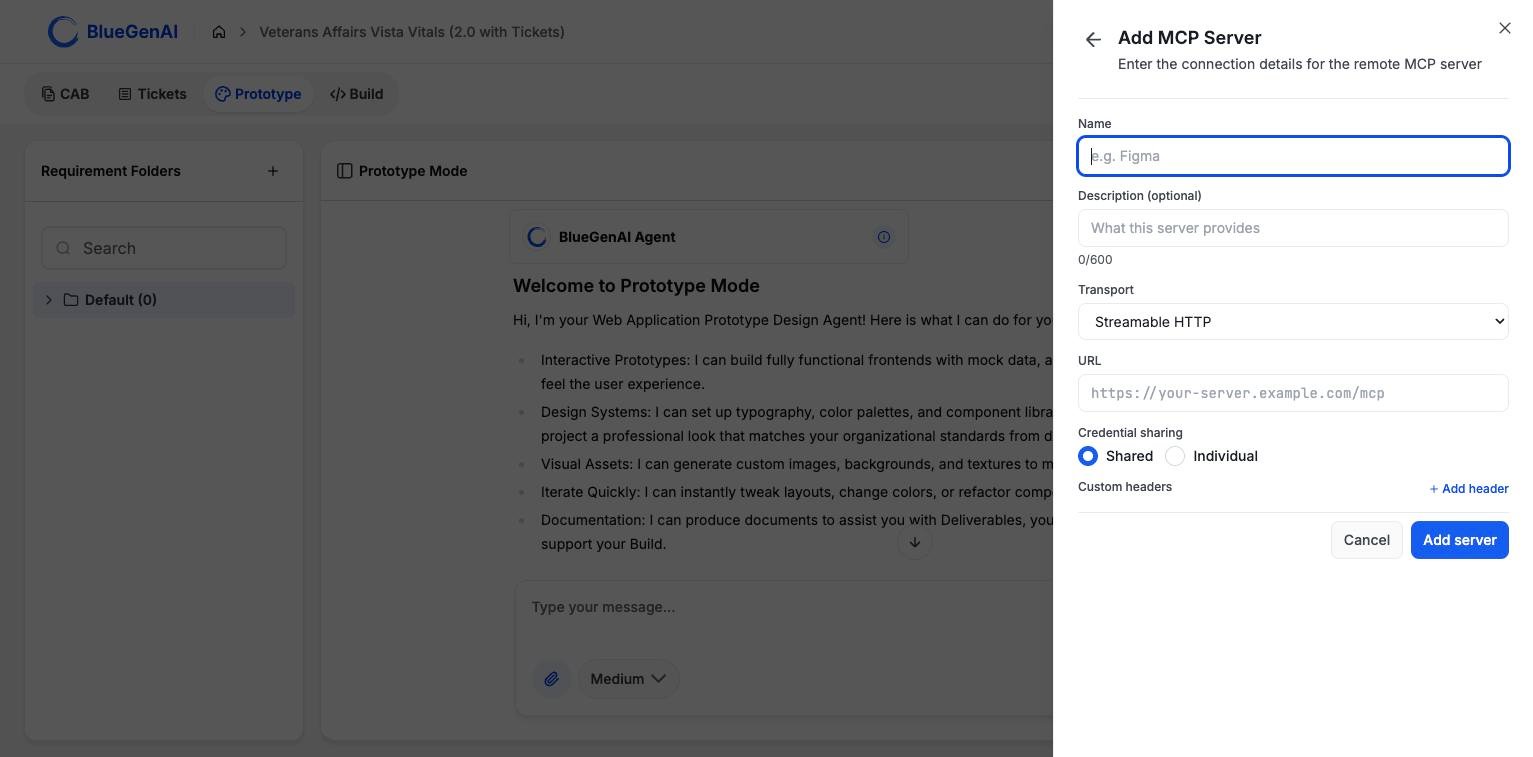 | Field | Notes |
| ---------------------- | ------------------------------------------------- |
| **Name** | How the server appears in your project |
| **Description** | Optional, up to 600 characters |
| **Transport** | `Streamable HTTP` or `SSE` |
| **URL** | The server's endpoint |
| **Credential sharing** | `Shared` or `Individual`; see below |
| **Custom headers** | Optional key-value headers sent with each request |
### URLs Are Checked Before They Are Accepted
The URL is validated against a set of rules that block servers on private or internal addresses. The hostname is resolved first, so a public name pointing at an internal address is rejected too.
| Rejected | Message |
| -------------------------------- | -------------------------------------------------------------------------------- |
| Any scheme but HTTP or HTTPS | `Only http:// and https:// URLs are allowed` |
| Credentials embedded in the URL | `URLs with embedded credentials are not allowed` |
| A hostname that does not resolve | `Could not resolve hostname ''` |
| A private or internal address | `Hostname '' resolves to a private or internal address and is not allowed` |
## Connection States
| State | What it means |
| --------------- | ------------------------------------------------------------------ |
| `unconfigured` | Saved but never successfully tested |
| `testing` | A connection test is running |
| `auth_required` | Credentials were rejected, or authorisation has not been completed |
| `connected` | The last test succeeded |
| `error` | The last test failed for some other reason |
## Shared or Individual Credentials
**Shared** means one credential set is used by everyone on the project. **Individual** means the server definition is visible to everyone, but each person authorises with their own credentials.
Shared is the default. Choose Individual when the external service should see who is acting rather than one shared identity.
## How the Agent Uses Them
Tools from your connected servers are added to the agent's own set for that project. They are treated cautiously by default: the platform does not assume an external tool is read-only, and none of them are available in Ask mode.
That last point is deliberate. Ask mode is a read-only boundary, and an external tool could write, so MCP tools are excluded from it entirely.
## Your Next Step
Connected tools widen what a build can do. What the agent does with them follows the same rules as everything else.
The nineteen built-in capabilities and the boundaries around them.
How third-party credentials are requested and stored.
## Related topics
- [Integrations](/admin-platform/integrations.md)
- [Weekly release notes](/changelog/weekly-release-notes.md)
- [Git Integration](/web-apps/git-integration.md)
- [Cloning your project](/admin-platform/cloning-your-project.md)
- [Credentials](/web-apps/credentials.md)
| Field | Notes |
| ---------------------- | ------------------------------------------------- |
| **Name** | How the server appears in your project |
| **Description** | Optional, up to 600 characters |
| **Transport** | `Streamable HTTP` or `SSE` |
| **URL** | The server's endpoint |
| **Credential sharing** | `Shared` or `Individual`; see below |
| **Custom headers** | Optional key-value headers sent with each request |
### URLs Are Checked Before They Are Accepted
The URL is validated against a set of rules that block servers on private or internal addresses. The hostname is resolved first, so a public name pointing at an internal address is rejected too.
| Rejected | Message |
| -------------------------------- | -------------------------------------------------------------------------------- |
| Any scheme but HTTP or HTTPS | `Only http:// and https:// URLs are allowed` |
| Credentials embedded in the URL | `URLs with embedded credentials are not allowed` |
| A hostname that does not resolve | `Could not resolve hostname ''` |
| A private or internal address | `Hostname '' resolves to a private or internal address and is not allowed` |
## Connection States
| State | What it means |
| --------------- | ------------------------------------------------------------------ |
| `unconfigured` | Saved but never successfully tested |
| `testing` | A connection test is running |
| `auth_required` | Credentials were rejected, or authorisation has not been completed |
| `connected` | The last test succeeded |
| `error` | The last test failed for some other reason |
## Shared or Individual Credentials
**Shared** means one credential set is used by everyone on the project. **Individual** means the server definition is visible to everyone, but each person authorises with their own credentials.
Shared is the default. Choose Individual when the external service should see who is acting rather than one shared identity.
## How the Agent Uses Them
Tools from your connected servers are added to the agent's own set for that project. They are treated cautiously by default: the platform does not assume an external tool is read-only, and none of them are available in Ask mode.
That last point is deliberate. Ask mode is a read-only boundary, and an external tool could write, so MCP tools are excluded from it entirely.
## Your Next Step
Connected tools widen what a build can do. What the agent does with them follows the same rules as everything else.
The nineteen built-in capabilities and the boundaries around them.
How third-party credentials are requested and stored.
## Related topics
- [Integrations](/admin-platform/integrations.md)
- [Weekly release notes](/changelog/weekly-release-notes.md)
- [Git Integration](/web-apps/git-integration.md)
- [Cloning your project](/admin-platform/cloning-your-project.md)
- [Credentials](/web-apps/credentials.md)