
How to view your credits
- Click your user avatar in the top-right corner of any page
- Select My Credits from the dropdown menu
- The My Credits panel opens showing your current plan, balance, and credit breakdown
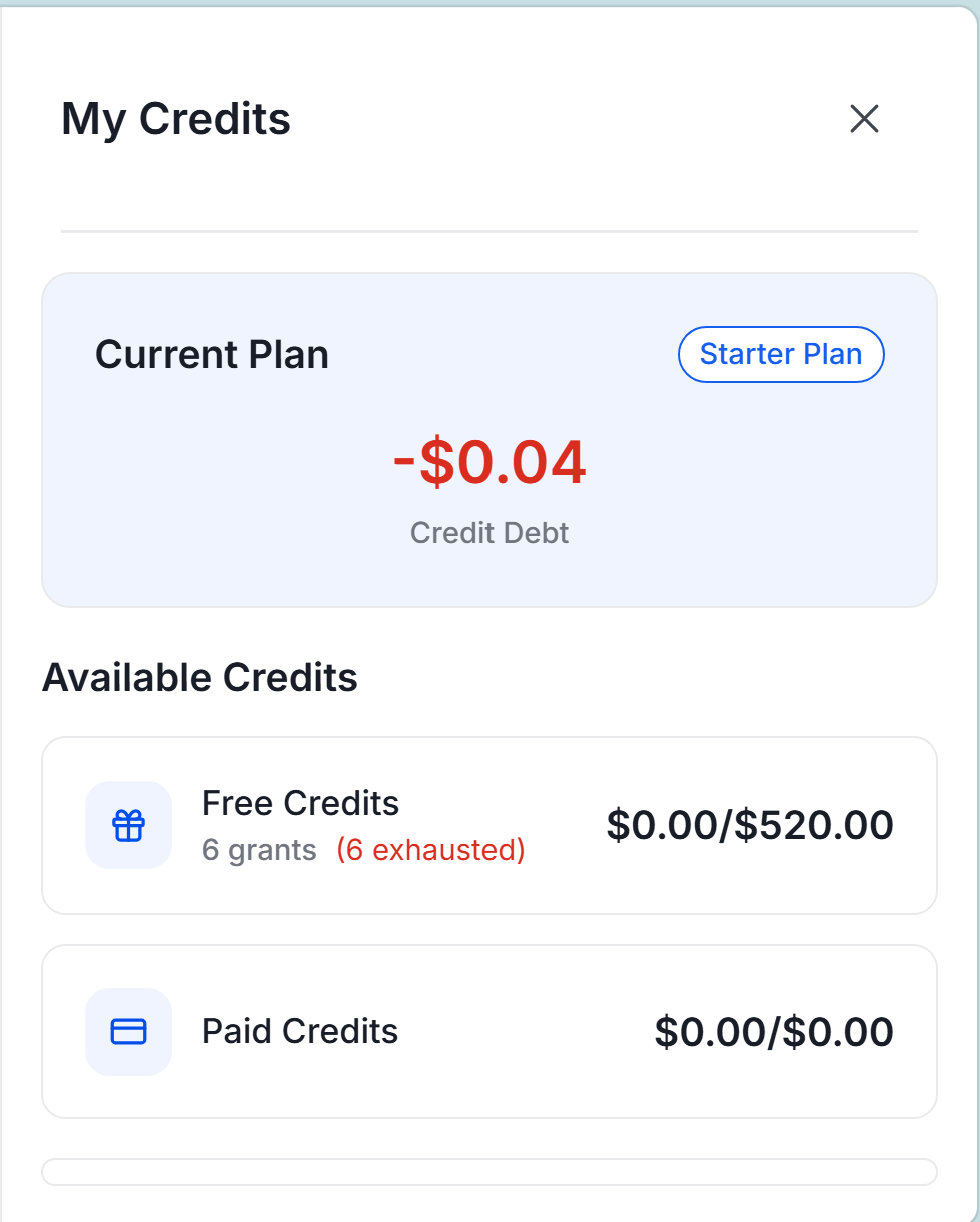
BlueGenAI credits come in two forms
Free Credits are granted to your account by an administrator — for example when you first sign up or when your organization provisions access. Free Credits do not expire and are consumed first. Your balance shows the number of grants received and how many have been exhausted. Paid Credits are credits you purchase directly. These are consumed after your Free Credits are exhausted. Both credit types are displayed in dollars and shown as total in your My Credits panel.Understanding the My Credits panel
Current Plan
Shows your active plan — for example Starter Plan. Your plan determines what types of credits are available to you.Credit balance
Your balance is displayed in dollars. If your credits are exhausted and usage continues, a Credit Debt amount is shown in red — this represents the amount owed beyond your available balance.Available Credits
Your credits are broken down into two types:How credits are consumed
Credits are consumed every time the AI agent processes a request. This includes:- Writing and submitting a prompt in the Prototype tab or Build tab
- Running a CAB analysis
- Generating design artifacts, prototypes, or application code
- Each refinement or iteration on existing work
Tips for managing your credit usage
- Write focused prompts — one goal per prompt uses fewer credits than a broad multi-topic prompt
- Attach only the files you need — unnecessary attachments increase the context size and credit cost
- Iterate in Prototype Mode before switching to Build — Prototype Mode is less credit-intensive than Build Mode
- Reuse saved design files — reference existing files rather than regenerating from scratch
- Start small — validate your approach with a focused use case before expanding scope
How to purchase additional credits
Credit purchasing and plan upgrades are managed through your account settings. Contact your platform administrator or the BlueGenAI team at feedback@bluegenai.com for assistance with credits or plan changes.
Related pages
Quick Start Guide
Start your first project and understand how credits are used in practice.
Admin Center
Administrators can manage credit balances and plans for all users from the Admin Dashboard.