
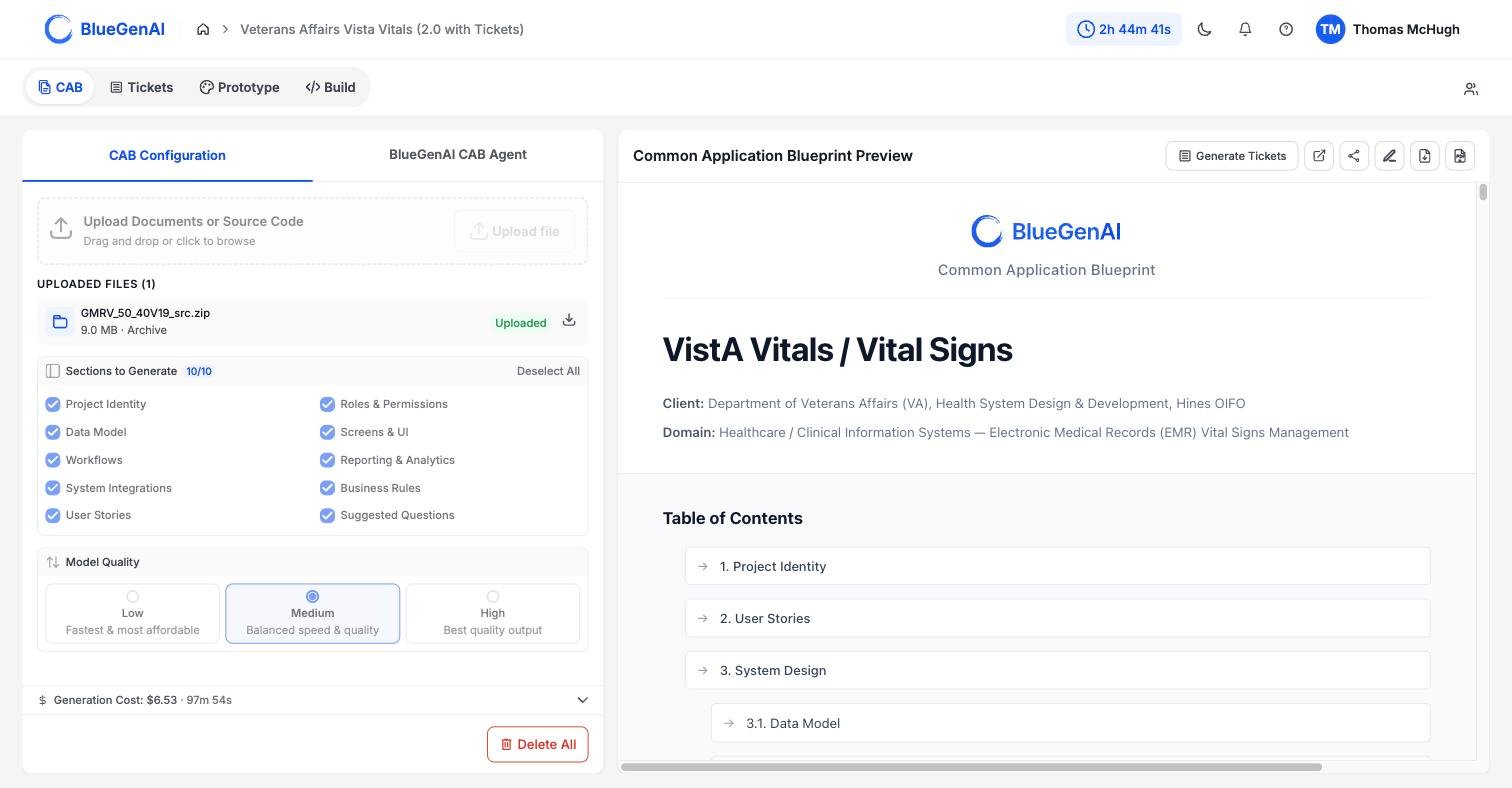
A completed CAB. The Sections to Generate checklist is on the left; the rendered document opens on the right.
The 10 Sections Defined
The rendered document groups the 10 sections under four top-level headings, with seven of them nested beneath System Design. The checklist labels differ slightly from the headings in the document.1. Project Identity
This is the section a stakeholder reads first, and often the only one they read. It carries the project name, the client, and one to three business domains, then four narrative fields: why the project exists, what the system does, who uses it, and the technology it runs on. It closes with cross-cutting constraints and an explicit in-scope and out-of-scope list.Where the source material named neither the project nor the client, the CAB infers both and marks them
[Inferred]. Where two source documents contradict each other, both readings appear and the discrepancy is noted rather than silently resolved.2. User Stories
User Stories group related functionality so that stakeholders, project team members, and AI agents can all read it directly. Each carries the familiar role, goal, and reason, then adds acceptance criteria and a numbered flow with the expected result of each step. Acceptance criteria cover error and edge paths as well as the happy path, which makes this section usable as a test basis. Review User Stories against your source material before you build from them, particularly for capabilities described in one document that apply to objects defined in another. A requirement stated once and applying broadly is the kind most worth checking has been carried through everywhere it belongs.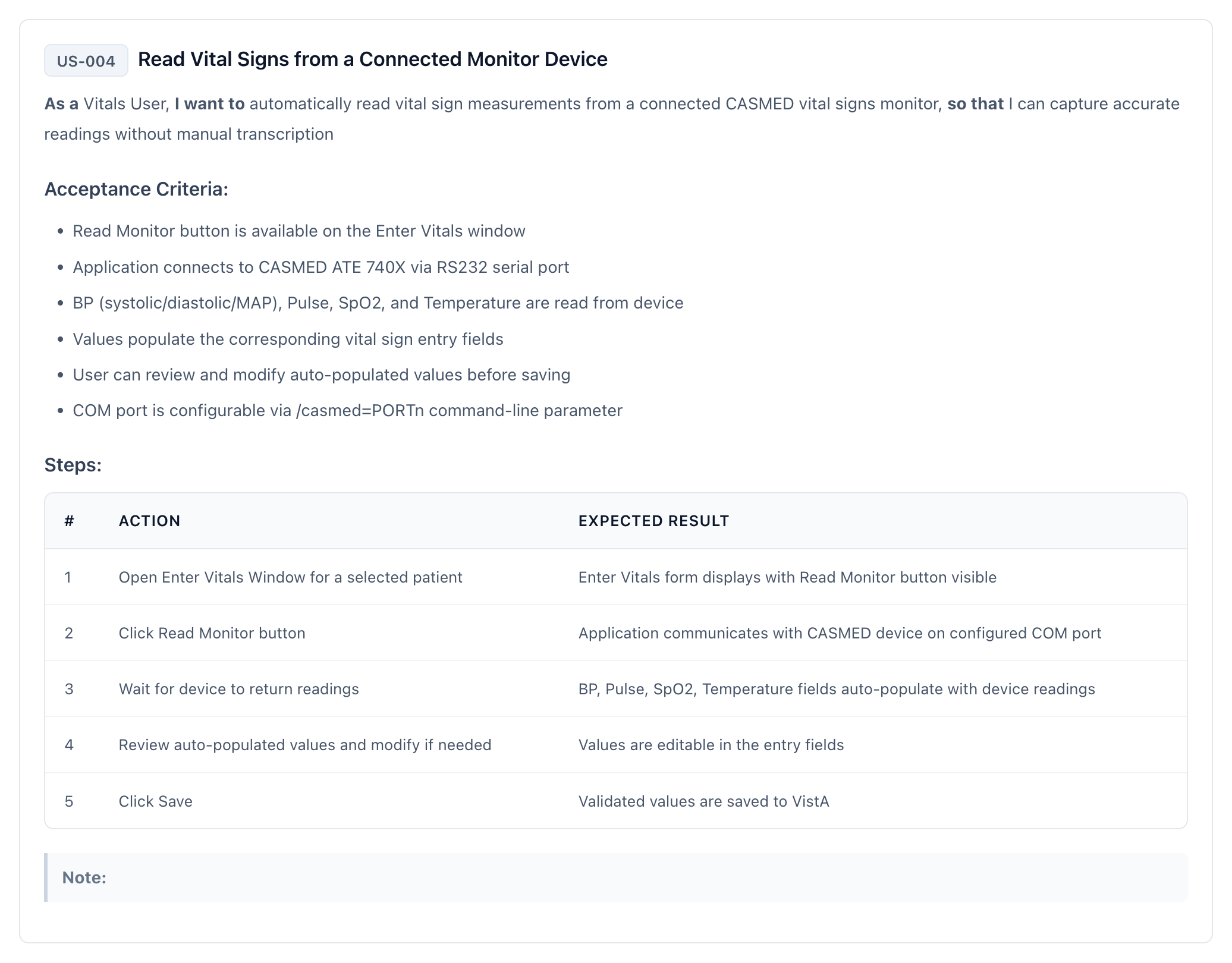
A generated User Story. The role, goal, and reason run across the top, followed by acceptance criteria and a numbered flow with the expected result of each step.
3. System Design
System Design groups the seven sections that specify the system itself. They run from the data the application holds through to the external systems it exchanges data with.3.1 Data Model
This section defines what the system stores and how the pieces relate. Entities carry a description and a field list, and every field states its data type, its constraints, and what it is for. Four further sub-sections sit alongside the entities: the enumerations referenced by fields, the relationships between entities and how many of one relates to how many of the other, cross-entity constraints, and a permission matrix that covers every entity rather than a sample.3.2 Screens & UI/UX
Each screen is specified closely enough to build from without a separate design pass. An entry names the screen’s purpose, which roles reach it, and how a user arrives and leaves, then its layout regions, components, form fields with validation rules, and buttons with the result of pressing each. Every screen also declares which data it displays and which entity supplies it, and defines its loading, empty, error, and success states.3.3 Roles
Every role here is someone who uses the application. Each entry gives the role a name, a description, a primary goal, and a permission list covering the modules that role can reach, with an access code such asCRUD, meaning create, read, update, and delete, or R for read-only.
Project delivery and governance roles are deliberately excluded. A Solution Architect, Project Manager, or Steering Committee oversees the work but never signs in, so none of them appears here.
3.4 Workflows
A workflow describes states and the transitions between them, not the tasks a person performs. Each one attaches to an entity type and lists its states, marking which is the starting state and which are terminal, along with the actions available in each. Transitions carry the detail. A transition names the state it moves from and to, the action that triggers it, the roles allowed to trigger it, any condition that has to hold first, and the validations that run.3.5 Rules
Rules are written as a condition and an outcome, in IF/THEN form. Each rule names what it applies to, whether that is an entity, a screen, or a workflow, and carries a priority, an active flag, and the error message a user sees when the rule blocks them. Rules are sorted into 11 categories: validation, eligibility, calculation, routing, notification, decision, scheduling, visibility, default, constraint, and audit. Only rules present or implied in your source documents appear. The CAB does not supply a standard rule set.3.6 Reporting & Analytics
Each report is defined by what it draws on and who receives it. An entry names the report’s purpose, the entities it reads, the roles that can run it, and whether it runs on demand or on a schedule. The detail covers filters, groupings, columns, calculated metrics with their formulas, and export formats. Delivered reports also record a schedule, recipients, and format. If the source material described no reports, this section is generated empty rather than invented.3.7 System Integrations
Every external system the application exchanges data with gets an entry. Each names the system, what the integration is for, and why it is needed. Three fields make integrations comparable across a portfolio: the method of exchange, such as a REST or SOAP web service, a message queue, or a file transfer; whether data comes in, goes out, or both; and how often, from real time through to on demand.4. Suggested Questions
This section is the CAB telling you what it could not determine. Each question carries the context that prompted it, the impact of leaving it open, concrete options to choose between, and the section it relates to. Questions are deduplicated across your source documents and ordered by impact, so the ones that most affect the build appear first. Treat this section as the agenda for your next requirements conversation.Project Identity and Suggested Questions are produced at a different stage from the other eight. Both are synthesised across your whole source set at once, which is why they can reconcile contradictions and rank questions by impact.
Your Next Step
A generated CAB is a first draft, and the parts you correct are usually the parts that matter most. Learn how to change it before you build from it.Correct a CAB before you build from it
How manual edits and AI-suggested changes are reviewed, and what gets recorded.
Turn a finished CAB into Tickets
What the conversion produces, and what happens when you run it twice.